 AI Training Platform
KGEN: Paid tasks to train AI
The KGEN is a microtask data collection and annotation platform for Artificial Intelligence. Know the opportunities, requirements and what to evaluate before starting.
Overview
What is KGEN?
The KGEN appears on lists of platforms that pay regular people to perform data collection and annotation tasks used to train AI models. The format is similar to other companies in the niche: you perform simple tasks using your cell phone or computer and send the material for review.
As public information about KGEN is limited, we recommend reading the terms of use, checking the requirements for each project, and starting with small tasks to test the platform before investing time in larger projects.
What is
Network of 'verified humans' that provides data to train AI (Physical AI and LLMs) as well as game and Web3 missions. The name comes from Kratos Gamer Network.
Origin
Company of Indian origin based in the United States, with official operations in Brazil since 2025.
How to pay
Per mission completed and approved. Example published on the platform itself: US$6 for evaluating 60 audios in a 'Brazil #1' campaign.
Also rewards
K-Points and the rKGEN (non-transferable) and KGEN tokens, on the Aptos blockchain, linked to the POGE reputation system.
Brazil
There are specific campaigns for Brazil and local leadership announced in October 2025.
Application
KGeN app on Google Play (rating 4.7 with around 2.7 thousand reviews and more than 100 thousand downloads) and on the App Store (rating 4.7).
Tasks
Task types
Audio evaluation
Listen to and evaluate audios in Portuguese within a mission. Campaign published by KGeN paid US$6 for 60 evaluated and approved audios.
AI Quests (AI training)
AI training missions officially described by the company in app stores, with multimodal data provided by verified people.
Recording routines via cell phone
Brazilian report describes partnership to pay participants who record daily activities on their cell phones for AI and robotics training.
Game and community missions
Game testing, on-chain engagement, and community contributions that increase your reputation and unlock rewards.
Ecosystem
KGEN ecosystem modules
KQuest
Missions module: where AI, games and community tasks are located.
KDrop
Distribution of rewards and campaigns from ecosystem partners.
Klash
Competitions between participants within the network.
POGE
Proof of human and reputation: defines your level and access to rewards.
Step by step
How does it work?
- 01
Sign up
Create an account via invitation and install the KGeN app on your cell phone.
- 02
Verification
Complete the profile and human test (POGE) to increase your reputation.
- 03
Mission
Open KQuest and choose a quest available for Brazil and your language.
- 04
Execution
Follow the mission instructions: evaluate audio, record, photograph or test.
- 05
Review
Delivery goes through quality control before becoming a reward.
- 06
Reward
The mission value, K-Points or tokens are credited to your account.
Having an approved account does not guarantee immediate availability of tasks. The volume of projects may vary depending on the region and the demand of the platform's customers.
Rewards
Rewards: cash, points and tokens
Payment per mission
Missions with a fixed value in dollars, paid after approval. The value is informed in the mission itself before you start.
K-Points
Engagement points accumulated on the network. The company announced more than 1 billion K-Points unlocked by 2026.
rKGEN
Non-transferable token on the Aptos blockchain, foreseen in the whitepaper for future conversion into KGEN in a 1:1 ratio.
KGEN
Utility and governance token, traded on cryptocurrency exchanges such as Bitget, Kraken and Gate.io.
Withdraw in Pix or reais
Information not publicly available. We recommend checking directly in the app or in the platform's terms.
Requirements
Requirements
Android cell phone or iPhone with the KGeN app installed
Stable connection to upload audio, photos or videos of missions
Native Portuguese for campaigns aimed at Brazil
Profile and reputation (POGE) to unlock better missions
In-app wallet for token rewards
Beware of scams: confirm that you are using the app or official link before providing data
Numbers
KGEN scale in numbers
38.9 mi
users reported by the company in October 2025
60+
countries where the company claims to have a presence
4,7
rating for the KGeN app on Google Play, with around 2.7 thousand reviews
100 thousand+
app downloads on Google Play
Analysis
Is KGEN reliable?
Real company, with institutional website, public whitepaper and technical documentation.
Investors mentioned by the company itself: Accel, Prosus Ventures, Jump Capital, Aptos and Polygon.
Official expansion in Brazil reported by the specialized press in October 2025.
App published in official stores with a rating of 4.7 and more than 100 thousand downloads.
User and revenue numbers are self-declared by the company, with no known independent external audit.
There are fake websites using the name KGeN, identified as phishing by security companies. Only use the app and official links.
Part of the rewards are in crypto tokens, whose value fluctuates and is not fixed income.
Balance
Pros and cons
Pros
- Missions with value informed before starting
- Specific campaigns for Brazil and in Portuguese
- You can only participate with your cell phone
- Official app in both stores, with good rating
- Various mission types: audio, AI, games and community
Cons
- Volume of missions varies depending on the current campaign
- Part of the reward is in token, subject to price variation
- Withdrawal rules in reais are not publicly documented
- Reputation system limits access to the best missions at the beginning
- Brand name is target of phishing scams
Transparency
What is not yet documented
Minimum withdrawal amount and payment methods in reais or Pix
Processing time and fees charged for mission withdrawals
Exact minimum age and documents required for verification
Guaranteed volume of missions available to Brazil
Active profile on Reclame Aqui or Trustpilot for the brand
Security
Security: how to avoid scams with the name KGEN
🔒 Only use the official KGeN app or the invite link on this page.
🔒 Be wary of 'allocation', 'airdrop' or 'launch' pages asking for wallet or recovery phrase.
🔒 Never tell anyone the security phrase (seed) of your wallet.
🔒 Check the value and rules of the mission before investing time in it.
🔒 Start with a small mission to understand the approval flow.
FAQ
Frequently asked questions
How much does KGEN pay?
Information not publicly available. We recommend checking directly in the app or in the platform's terms.
Does KGEN accept Brazilians?
The KGEN is cited in lists of data collection platforms for AI. The availability of projects for Brazil depends on the demand of each campaign.
What tasks are available on KGEN?
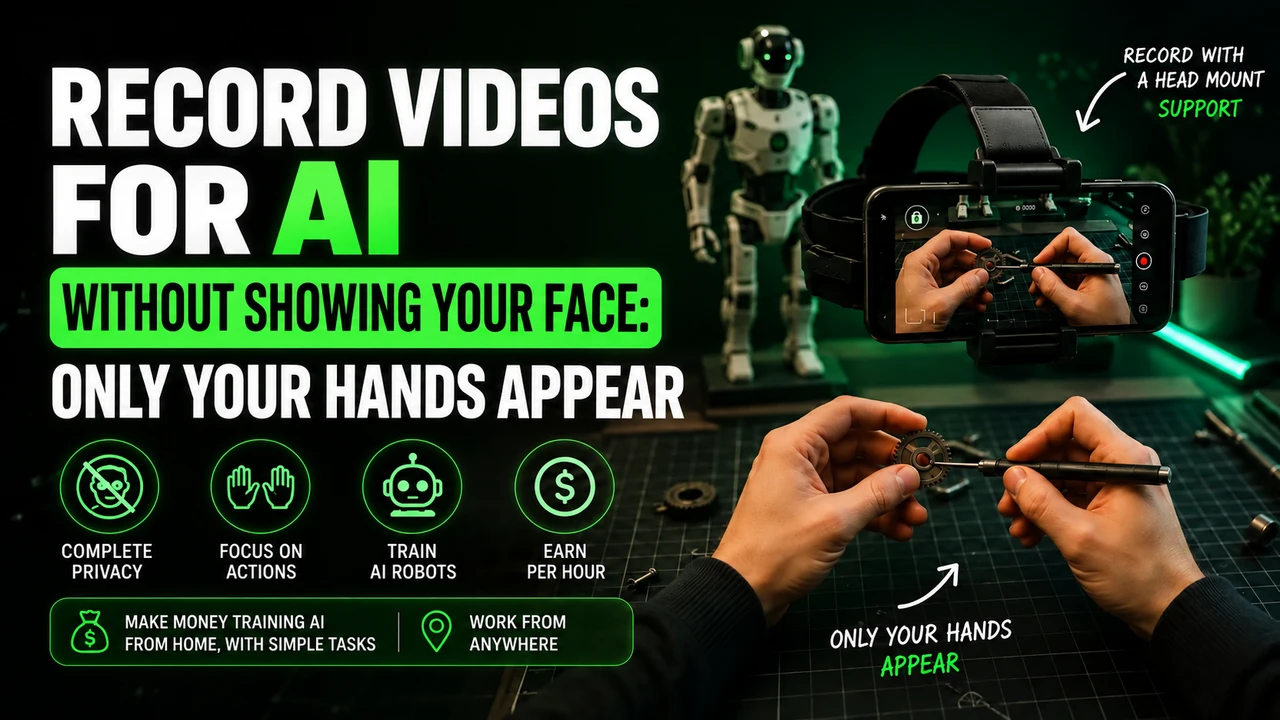
The most common tasks include recording first-person videos, audio and voice, photos of objects and environments, as well as annotating and classifying data.
Do you need special equipment?
Most tasks can be done with a modern cell phone and an internet connection. Some first-person video projects may require a head strap.
Is KGEN reliable?
The platform is mentioned in lists of AI data collection companies, but detailed public information about payment, deadlines, and support is limited. Read the terms before starting.
Keep researching before you start
Read our guides on how to record videos for AI, choose equipment, and understand the data collection market before signing up to any platform.
This article may contain affiliate links. When you register through our link, we may receive a commission at no additional cost to you.
How to record in first person for KGEN
On KGEN, start with the Quest, which is the campaign or task available on your account. This guide deals with recording activities in first person: the cell phone follows your gaze, as if the camera were in your eyes, and shows your hands working. Videos of this type can be used for training robotics and humanoid robots. Check the Quest for the purpose and activity requested.
head strap: adjust before recording
For a KGEN Quest that requires head-mounted video, prepare a cell phone-grade headstrap. Hold the device securely and adjust the angle to show hands and objects without using your other hand to hold the camera. Do not exchange the requested position for a tripod, table or improvised mount. Check the horizontal orientation in the project before recording.
To prepare this framework, you can buy the cell phone head mount at Shopee. Check if the fit holds your phone model and allows you to direct the lens into your hands. It is an affiliate link for the portal; The advertisement does not represent an endorsement of the accessory by KGEN.
Which cell phone to use on KGEN?
For a KGEN Quest that uses Minute, use this list as a preparation reference and confirm release in the app and on the Quest itself:
iPhone 12 to 17 (except 16e and 17e), Google Pixel 6 to 9 and Samsung Galaxy S21 to S26 (except FE models). You can also check your device directly in Minute app. Having a good resolution camera alone does not prove compatibility.
Before spending on equipment, check if your participation is approved. If you need, you can consult the option of renting a compatible cell phone. Confirm the complete model: the iPhone 16e/17e and Galaxy FE versions are outside the list recommended for Minute.
Account and application when working with KGEN
If KGEN Quest forwards you to Minute, reserve an email for this participation and follow the instructions to use the same address for both registrations. A dedicated Gmail helps separate messages and access. Do not reuse a Minute account linked to another external project without guidance. The public page consulted does not confirm a universal rule for Minute accounts for all Quests.
When requested by the project, Minute Data is used to select activity, record, send and track sessions. Install via the official integration link. Read the instructions displayed before capturing and check if the sending has finished; Leaving the video on the device does not mean it has arrived for analysis.
The invitation code synchronizes
When the Quest asks to sync with Minute, look for the organization code in your own KGEN account within the campaign instructions. It links the recording to the correct destination. The invitation to create a registration at KGEN and Minute organization code have different functions; do not use one in place of the other.
How to do the task without looking like a robot
If a KGEN Quest asks for tool organization, show actual separation and organization until completed. Don't submit a cooking video for this campaign just because the quality is good. Also, don't spread the tools again to repeat the same task: the recording needs to advance and correspond to the chosen Quest.
Work at your normal pace. Don't keep your arms outstretched all the time just to show your hands; adjust the camera angle. Avoid filming stopped without activity, purposeful slowness and endless actions. The repetition that is part of the job, like washing different dishes, is different from repeating the same gesture unnecessarily.
Alert: beware of rejections and account blocks on KGEN
Before pressing record: follow the rules of the task and application indicated. A video rejection and an account block are different situations.
- Don't record sitting down in domestic tasks while standing. Only do a seated task if the specific instructions clearly authorize it.
- Do not artificially lengthen the video. Avoid long waits, staged tasks and repeated movements without progress.
- Don't force a robot posture. Move your hands and arms naturally while performing the activity.
- Keep children out of the recording. Do not capture the faces of adults or children; Also check out mirrors, photographs and screens around.
- Wear appropriate clothing for the activity. Keep the focus on your hands and objects, avoiding exposing your torso, neck or other parts of your body unnecessarily. Hands and forearms are part of the frame of the action; follow the task if it asks for another detail.
- Do not improvise the camera position. Use the required head mount and check light, clarity, battery and headroom.
- Do not submit a task other than the one chosen. Check the recording instructions and destination before you begin.
These precautions guide the preparation of the video. The suspension conditions are those of KGEN design and the application used; There is no basis for assigning a single ban policy to all projects.
The Minute no longer lets you record: what to do?
Check the displayed message, update the application and check the device and connection. For Minute, the reference is iPhone 12 to 17 (except 16e and 17e), Google Pixel 6 to 9 and Samsung Galaxy S21 to S26 (except FE models). If the device is not supported, test access on a supported model as per design guidance.
If there is suspension, record the message and ask the support indicated by KGEN for analysis. Deleting the account and opening another one with a different email is not a guaranteed solution to a ban. Only recreate the account if support advises you and the rules allow it. Exclusive email to link a project should not be confused with authorization to bypass a suspension.
Last conference for KGEN
Before sending to KGEN, check the selected Quest, the required activity, the deadline and synchronization, when applicable. A correctly recorded file may still be rejected if it does not meet the campaign. Do not consider points, balance or payment released before the approval foreseen in the project.
Check again: iPhone 12 to 17 (except 16e and 17e), Google Pixel 6 to 9 and Samsung Galaxy S21 to S26 (except FE models), when the stream uses Minute. Validate the model in the app before purchasing or renting.
Reference consulted on 09/10/2026: KGEN: information about operation and projects. The use of Minute and the list of devices are conditional on the project; the public source does not present them as a universal requirement.