Record Videos for AI Without Showing Your Face: Only your hands appear
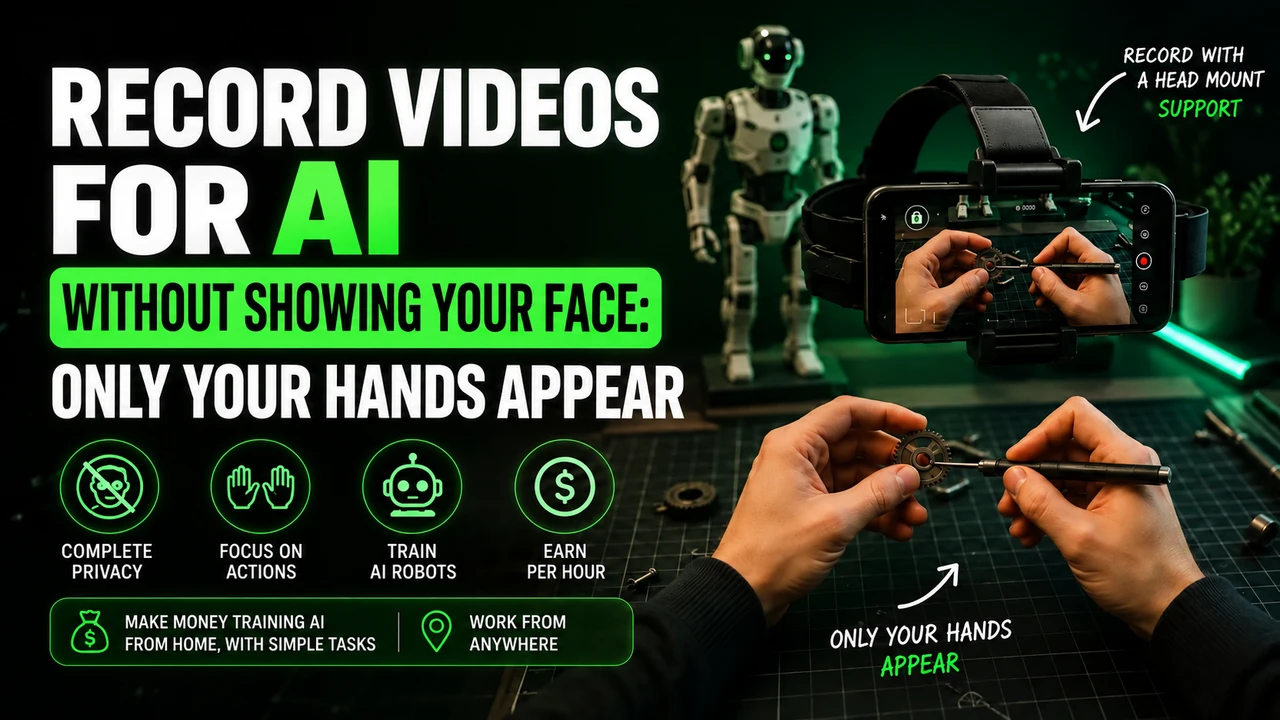
"But will I appear in the video?" It's almost always the first question asked by anyone who hears about this work for the first time — and it makes perfect sense to ask. No one wants to expose their face, home or family to earn extra income. The good news is that the answer is no, and the technical reason behind this is quite simple to understand.
This guide complements the main article about recording videos to train AI focusing specifically on the privacy part: how the equipment works, what is the right angle and how to protect your home and family during recordings.
Solving it straight awayThe question that stops a lot of people
Question number one has a simple answer
No, you don't need to show up. It's the question that appears most often in the comments of those discovering this work for the first time, and the answer is always the same: the camera is facing downwards, towards your hands, the way an action camera attached to the helmet would film a trail.
This isn't an editing trick or a special privacy feature of the app — it's simply basic camera placement physics. A camera attached to the forehead, pointed forward and downward, physically cannot capture the face of the person using it. It's the same principle as an action camera in a cyclist's helmet: it shows the trail, not the cyclist.
This technical detail is what allows this type of work to exist for so many people who, otherwise, would never consider exposing their own image online. It's privacy by design, not by company promise — the physics of positioning guarantees that regardless of what any terms of use say.
The equipment behind the solutionHow head strap solves this
The head strap is basically an elastic band with a slot for the cell phone at forehead level. It exists precisely to solve two problems at the same time: keep your hands completely free to perform the task, and capture the scene exactly from the angle you see it, without including your own face in the frame.
From the point of view of whoever is on the other side — the company receiving the video — this format is also the most technically useful. AI models trained with first-person vision learn to associate hand movement with task outcome in a much more direct way than they would learn by watching a third-person video, filmed from afar, showing the entire person. In other words: the same format choice that protects your privacy is also the one that generates the most valuable data for those who are purchasing.
Finding this accessory is not difficult or expensive — simple models cost very little on popular marketplaces. We detail the options and what to look for when buying in the guide best cell phone and equipment to record videos for AI.
There is also the option of a chest support, attached at chest level instead of the forehead. It offers a slightly different angle, useful for tasks where you occasionally need to look up (like organizing a high shelf) without losing the frame of your hands. Neither option is mandatory — choose the one that is most comfortable in your routine.
The technical detail that makes a differenceThe right recording angle
The angle that avoids 90% of problems
Cell phone lying horizontally, tied to the forehead with the band, tilted approximately 45 degrees down, with you standing. This angle captures your hands and work area without the chance of catching your face reflected in any surface.
It's worth testing before recording the actual task: attach the support, look down as if you were going to pick up an object from the sink, and record 10 seconds of testing. Play it back and check that the frame shows your hands clearly and nothing else. Adjusting once at the beginning saves multiple rewrites later.
There is no standard bodyAdjusting the angle for your body type
People who are taller or shorter, with longer or shorter necks, need to adjust the tilt angle a little differently than the standard 45 degrees. The rule of thumb is simple: the correct framing is one in which you can clearly see your own hands working without having to bend your neck too much, which would cause discomfort in longer sessions.
A tip from those who have recorded hundreds of videos: make the initial adjustment in front of a mirror, without the mirror appearing in the actual recording later — only use it to calibrate the track angle once. Once you've found the right point, mark the position of the band adjustment (many models have velcro or locks) so you don't have to recalibrate every time.
This one-time calibration process usually takes about five minutes the first time and saves time on all subsequent recordings — it's worth the initial investment of attention.
Beyond your faceProtecting home privacy
Not showing the face solves the most obvious concern, but there are other details worth considering before pressing "record". The table below summarizes the most common points:
| What usually appears unintentionally | How to avoid |
|---|---|
| Reflection in mirror or glass | Check the frame before starting, rotate your body if necessary |
| Cell phone/computer screen with personal data | Lock the screen or turn the device over before recording |
| Another person passing by in the background | Notify those who live with you about the recording time |
| Documents and correspondence on the bench | Keep everything with address or personal data visible before |
| Child's voice in the background | Record in a separate environment when there are children at home |
When something gets out of controlWhat if someone shows up accidentally?
It happens, especially in houses with more people. If you notice during recording that someone has entered the room, the simplest thing to do is stop and re-record from scratch. If you only realize it later, when reviewing the material before sending, it's also worth re-recording — it's quicker than dealing with the consequences of sending something that exposes another person without consent.
A practice that really helps those who live with someone else is to arrange a simple sign with the person who lives in the house — a sign on the door, a notice in the family group — letting them know that the recording is in progress. This drastically reduces the chance of unexpected interruptions and avoids having to re-record almost completed tasks.
The camera shows what you see, not who you are. That's the entire principle behind privacy in this type of work.
You are not the only one with this doubtWhy initial hesitation is normal
If you've read this far and are still a little hesitant, this is completely normal — and even healthy. Exposing any part of your personal life, even if it's just a kitchen or a backyard, affects anyone's sense of privacy. The difference between healthy hesitation and unfounded fear is information: when you understand exactly what appears in the video and what doesn't, the decision becomes much simpler to make, and the initial discomfort tends to subside quickly.
It's worth a practical exercise: record a 30-second test video doing any simple task, watch it back as if you were a stranger watching it for the first time, and ask yourself what this video really reveals about you. In the vast majority of cases, the answer is: very little beyond your hands and the task being done. This simple exercise usually resolves much of the initial insecurity.
Before you startQuick checklist before recording
After a few recordings, this checklist becomes automatic and takes less than a minute to check:
- Adjusted and tested head strap with a short recording
- Mirrors and reflective surfaces outside the viewing angle
- Cell phone and computer screens locked or turned
- Documents and correspondence outside the bench
- Other people in the house notified about the recording time
Still in doubt?FAQ
Is it mandatory to use head strap?
In practice, yes — it's the only way to keep your hands free to perform the task while recording in first person. Without the support, you would need to hold the cell phone in one hand, which makes most household tasks impossible.
Does my face appear if I look down?
No. The camera is fixed on the forehead pointing forward and down, in the same direction as your gaze. It captures what you see, not your face — in the same way that a helmet-mounted GoPro never captures a biker's face.
What if I appear in a reflection without realizing it?
It is worth reviewing the video before sending. If you notice a problematic reflection, it's better to re-record than send it anyway — in addition to the privacy issue, this can also cause disapproval.
Can I record with other people at home?
You can, but ask them to avoid entering the room during recording. Third-party people appearing without authorization is one of the most common reasons for disapproval and also a matter of respecting their privacy.
Do I need to notify the platform if something went wrong in the video?
If you notice after sending that something sensitive has appeared, contact the platform's support to ask for the material to be removed before it is processed.
Is it normal to feel discomfort during the first recordings?
Yes, completely normal. Most people report that the feeling of strangeness passes after the first two or three recordings, when it becomes clear in practice how much the video is really focused on just the task.
Keep learning about recording