 AI Training Platform
Claru AI: how to make money recording videos to train robots
Complete guide on free registration, domestic and professional tasks, first-person recordings, approval and Claru opportunities for Brazilians.
Payment
Varies by project
Region
International projects
Tasks
Videos + data + reviews
Cell phone
iPhone and Android*
Receiving
Defined in the project
Transparency: claru.org is our affiliate link. Registration is free and we may receive commission on accepted work, at no cost to you. Ganhe Treinando IA is an independent source, not an official employer or recruiter of Claru.
Summary
Claru in 30 seconds
What is
International data collection and training platform for AI.
What do you do
Performs tasks and, in some projects, records everyday activities.
How much do you pay
It depends on the project, country and approved work.
How do you receive
Currency, method and deadline appear in each project brief.
Brazil
There are projects aimed at Latin America.
Application
Collection made by the official Claru Collector app.
Overview
What is Claru?
Claru is a data collection and preparation company for Artificial Intelligence training. It hires remote collaborators to generate real data: first-person (self-centered) videos of everyday activities, gameplay recordings, as well as data annotation and evaluation.
Physics AI
Data that teaches machines to understand the physical world.
Robotics
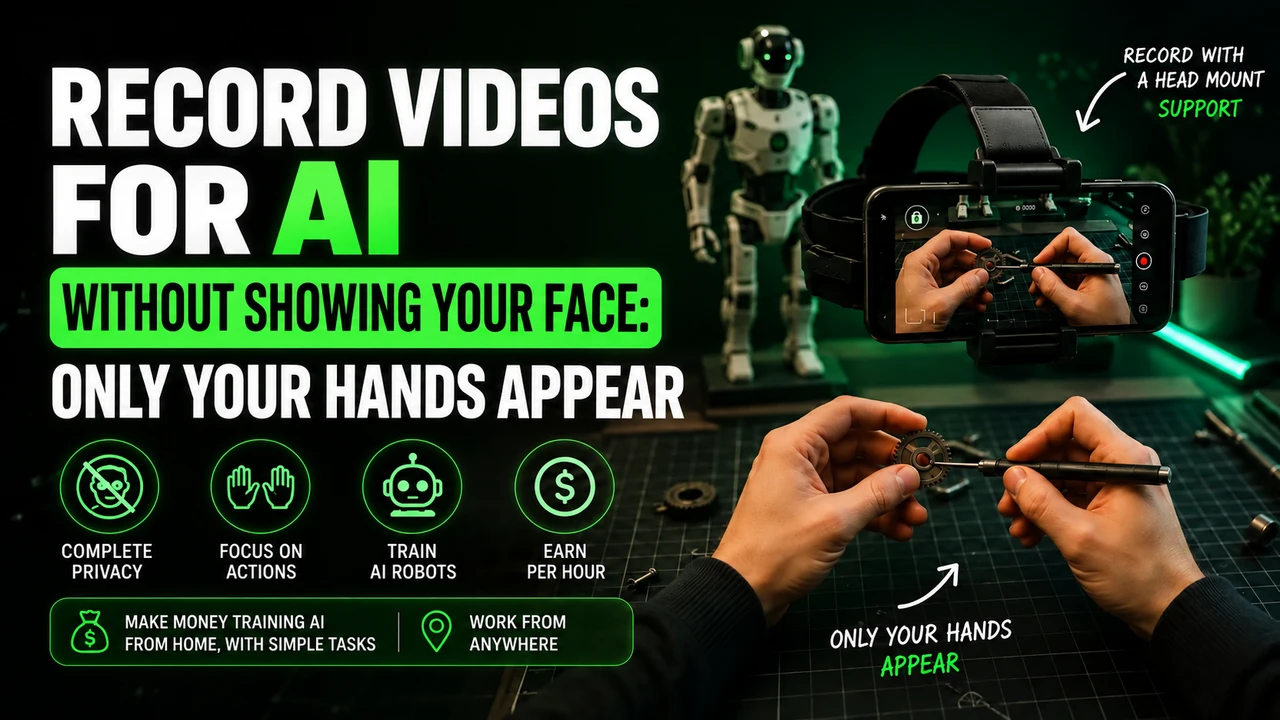
Videos of human hands performing real tasks.
First person
Camera at eye level, showing activity.
Annotation
Human classification and evaluation of data and responses.
Want to understand better?
View tasks and projectsStep by step
How does it work?
- 01
Sign up
You create an account on Claru website with email and basic data.
- 02
Profile
Complete the profile by informing country, languages and available equipment.
- 03
Project
Search among the open projects for those that accept your region.
- 04
Qualification
It goes through screening, testing or sample video according to the project.
- 05
Task
Performs the task exactly following the script and instructions.
- 06
Approval
The material is reviewed by the project quality team.
- 07
Payment
Approved work goes into the project payment calendar.
Having an account does not guarantee immediate availability of tasks.
Payment
How much does Claru pay?
Values published in the platform's own projects. Conversion at a rate of US$1 ≈ R$5.
| Project | Payment | In reais | Region | Source |
|---|---|---|---|---|
| Household chores | $6/hr | ≈ R$ 31/h | LATAM (BR, MX, AR, CO, CL, PE) | Official information |
| Warehouse and stock | $7/hr | ≈ R$ 36/h | LATAM (BR, MX, AR, CO, CL, PE) | Official information |
| Gaming | $15–25/hr | ≈ R$ 77/h | Eligible countries (includes Brazil in open projects) | Official information |
| Kitchen | Not officially released. | — | As per published project | Verified information |
| Retail | Not officially released. | — | As per published project | Verified information |
| Restaurant | Not officially released. | — | As per published project | Verified information |
| POV Video (USA/Canada) | $15–30/hr | ≈ R$ 77/h | USA and Canada | Official information |
*Prices may change depending on project, country and approval. Not officially released. in the marked cases.
View payments and how to receiveSimulation
Quick calculator
US$/week
—
R$/week
—
US$/month
—
R$/month
—
Mathematical estimate with a quote of US$1 ≈ R$5.15. It does not represent a guarantee of hours or income.
Tasks
Task types
Videos
First person recording with cell phone and head strap.
Home
Cleaning, laundry, organization and small repairs.
Kitchen
Food preparation and complete kitchen routine.
Retail
Product handling, replacement and service.
Restaurant
Salon service, dish assembly and professional cooking.
Garden
Gardening, pruning, watering and caring for plants.
Garage
Tools, car maintenance and DIY projects.
Office
Administrative tasks, paperwork and use of equipment.
Warehouse
Separation, packaging, labeling and movement of boxes.
Gaming
Recorded gameplay with command capture.
AI Assessment
Compare and evaluate responses, images and audio generated.
Annotation
Label, classify, and review data for training.
Recording
What are the videos like?
Format
As per project instructions
Framework
Visible hands and activity when required
Duration
Defined by project
Equipment
Cell phone or specified equipment
Approval
Videos must follow project rules
Equipment
Which cell phone do I need?
- ✓ iPhone compatible with Claru Collector app (published only for iPhone in the App Store)
- ✓ Rear camera with ultra-wide lens, used for first-person perspective
- ✓ Enough free space to record 1080p video for long sessions
- ✓ Availability of the app for Android varies depending on the project
- ✓ Some projects only indicate iPhone; check the vacancy before purchasing equipment
- ✓ When accepted, the device must record 1080p stably
Do I need to buy equipment?
Only if the project requires it. Check the requirements before purchasing any accessory.
Requirements may change depending on the project.
Application
📱 Claru Collector
The official Claru app records video in 1080p via the rear camera with an ultra-wide lens, simultaneously capturing data from motion sensors. It is released to authorized collaborators and it is through it that collection sessions are sent.
Start by registering at the affiliate link above. Then, follow your account's instructions to install the application indicated for the project.
Receiving
How to receive?
Method
Informed in the briefing
Deadline
Informed in the project
Others
According to the project
- CLARU
- ↓
- APPROVED WORK
- ↓
- PAYMENT
- ↓
- WISE/PAYONEER
- ↓
- BRAZILIAN BANK
Methods and deadlines may vary depending on the project.
View full payment guideDeadlines
When does Claru pay?
Payment
Projects can use different calendars. The payment schedule varies and must be confirmed in the project conditions.
Always check the project conditions.
Brazil
🇧🇷 Claru for Brazilians
Brazil
There are LATAM projects
Dollar
Values normally announced in USD
Method
Defined in the briefing
Deadline
Defined in the project
English
Depends on the project
Cell phone
Check the requirements
Eligibility
Requirements
Minimum age according to the project
Country eligible for the chosen vacancy
Account verified on the platform
Compatible equipment
International payment method
Follow the itinerary instructions
Work approved in review
Requirements may vary between projects.
FAQ
Do you need to speak English?
It depends.
Some projects can be completed with little English requirement, while others may require understanding English instructions.
See guide for BraziliansPortal analysis
Is Claru reliable?
✓Company identified and with its own platform
✓Official application published in stores
✓Public terms and policies
✓Projects published with values and countries
✓International payment methods
✓International presence (USA, Canada, LATAM, Asia)
!Reports from Brazilian users still in small volume
Claru presents itself as a structured operation: identified company, official app in stores, public vacancies with eligible values and countries and active projects for Latin America. On the other hand, the availability of tasks is variable and payment depends on approval — there is no guarantee of earnings.
Balance
Pros and cons
Advantages
- 100% remote work, done from home
- International projects with payment in dollars
- Some tasks are simple and everyday
- Payments in foreign currency
- Various project types: video, gaming, data
Challenges
- Projects may become unavailable or close
- Work must be approved to generate payment
- Requirements vary greatly between projects
- International payments may incur fees
- There is no guarantee of hours or income
Updates
Latest Claru Updates
New project · 05/26/2026
Warehouse and open inventory for LATAM at US$7/h
Active project · 05/27/2026
Domestic chores LATAM remains open at US$6/h
Application update · 08/26/2026
Claru Collector records 1080p video with ultra-wide lens and sensor data
Verified on 08/31/2026. Projects may close or change; Check your dashboard before planning income or purchasing equipment.
Authorship
Editorial review and experience

Daniel Olímpio
Web developer with over 20 years of experience in the digital market and editor of Ganhe Treinando IA. This guide was revised by comparing institutional pages, public terms and vacancies dated from Claru. Variable information is identified as examples, not guarantees.
Meet the authorSources and important information
Institutional source
We consulted the official Claru website, the Brazilian page for employees, the legal center, case studies and public vacancies. Corporate data and general rules come from these pages.
Dated vacancies
Values quoted describe specific announcements for 2026. They prove that there was that opportunity, but they do not form a permanent table and do not promise the same remuneration in future projects.
Commercial relationship
Ganhe Treinando IA is an independent referral source. The claru.org address is our affiliate link and leads to platform registration.
How to record in first person for Claru
At Claru, egocentric video is recording made from the perspective of the person performing the activity. In simple terms, it's like putting a camera in your eyes: the video shows your hands interacting with tools and objects. The purpose is to support the learning of physical actions by robotic systems, including applications that can be used in humanoid robots.
What Claru checks in the recording
The Claru technical page highlights sharpness, stability, field of view and continuity of action. Upon submission, the company checks the resolution, duration, orientation and integrity of the file, with human review afterwards. There is an example of professional 4K collection at 60 frames per second; This does not make 4K/60 the rule for every task. The project defines the correct configuration. In practice, check that your fingers and objects are visible and that all important steps fit into the frame.
head strap: adjust before recording
In a Claru project that requires a cell phone on the head, use a headband suitable for the device and adjust the lens to the work area. Do not replace the requested support with a recording from afar or a supported cell phone. Claru also describes wearable camera projects; Therefore, confirm your collection equipment before purchasing any accessories.
To prepare this framework, you can buy the cell phone head mount at Shopee. Check if the fit holds your phone model and allows you to direct the lens into your hands. It is an affiliate link for the portal; The advertisement does not represent an endorsement of the accessory by Claru.
Which cell phone to use on Claru?
The Claru defines equipment according to collection. If your project calls for Minute, check this reference in the app; it is not a device approval published by Claru:
iPhone 12 to 17 (except 16e and 17e), Google Pixel 6 to 9 and Samsung Galaxy S21 to S26 (except FE models). You can also check your device directly in Minute app. Having a good resolution camera alone does not prove compatibility.
Before spending on equipment, check if your participation is approved. If you need, you can consult the option of renting a compatible cell phone. Confirm the complete model: the iPhone 16e/17e and Galaxy FE versions are outside the list recommended for Minute.
Account and application when working with Claru
The Claru page provided for this review describes its own capture structure and does not confirm mandatory use of Minute. Use the app indicated in your employee invitation. If a collection from Claru is forwarded to Minute, send an email to it and follow the link indicated; Gmail is just a practical preference. Do not link a Minute account that already uploads recordings to another platform on your own.
When requested by the project, Minute Data is used to select activity, record, send and track sessions. Install via the official integration link. Read the instructions displayed before capturing and check if the sending has finished; Leaving the video on the device does not mean it has arrived for analysis.
The invitation code synchronizes
If Claru project requests an organization code in Minute, obtain it from the instructions in your own Claru account or from the support indicated in the official invitation. This field synchronizes participation; it is not a generic code found in videos. Without an instruction for using Minute, continue to the collection application indicated by Claru.
How to do the task without looking like a robot
Imagine a Claru collection about folding clothes. Position the pieces, fold and arrange each one until finished. The interest is in the sequence of the hands and the use of objects. Don't undo the folds to produce more minutes. This is a running example; Only record the activity if it is authorized in your project.
Work at your normal pace. Don't keep your arms outstretched all the time just to show your hands; adjust the camera angle. Avoid filming stopped without activity, purposeful slowness and endless actions. The repetition that is part of the job, like washing different dishes, is different from repeating the same gesture unnecessarily.
Alert: be careful with rejections and account blocks on Claru
Before pressing record: follow the rules of the task and application indicated. A video rejection and an account block are different situations.
- Don't record sitting down in domestic tasks while standing. Only do a seated task if the specific instructions clearly authorize it.
- Do not artificially lengthen the video. Avoid long waits, staged tasks and repeated movements without progress.
- Don't force a robot posture. Move your hands and arms naturally while performing the activity.
- Keep children out of the recording. Do not capture the faces of adults or children; Also check out mirrors, photographs and screens around.
- Wear appropriate clothing for the activity. Keep the focus on your hands and objects, avoiding exposing your torso, neck or other parts of your body unnecessarily. Hands and forearms are part of the frame of the action; follow the task if it asks for another detail.
- Do not improvise the camera position. Use the required head mount and check light, clarity, battery and headroom.
- Do not submit a task other than the one chosen. Check the recording instructions and destination before you begin.
These precautions guide the preparation of the video. The suspension conditions are those of Claru design and the application used; There is no basis for assigning a single ban policy to all projects.
The Minute no longer lets you record: what to do?
Check the displayed message, update the application and check the device and connection. For Minute, the reference is iPhone 12 to 17 (except 16e and 17e), Google Pixel 6 to 9 and Samsung Galaxy S21 to S26 (except FE models). If the device is not supported, test access on a supported model as per design guidance.
If there is suspension, record the message and ask the support indicated by Claru for analysis. Deleting the account and opening another one with a different email is not a guaranteed solution to a ban. Only recreate the account if support advises you and the rules allow it. Exclusive email to link a project should not be confused with authorization to bypass a suspension.
Last conference for Claru
Before recording to Claru, confirm equipment, application, orientation, resolution, and duration in the project. The technical page describes automatic file validation and human review. This does not guarantee approval of any recording or a payment deadline for your account.
Check again: iPhone 12 to 17 (except 16e and 17e), Google Pixel 6 to 9 and Samsung Galaxy S21 to S26 (except FE models), when the stream uses Minute. Validate the model in the app before purchasing or renting.
Sign up to Claru using our affiliate link. The use of Minute and the list of devices are conditional on the project; the public source does not present them as a universal requirement.
Questions
Claru FAQ
Do you need to speak English to work at Claru?
It depends. Some projects can be carried out with little English requirement, while others require understanding instructions in English, as the platform is international.
Does Claru accept Brazilians?
Yes, there are projects aimed at Latin America that list Brazil among the eligible countries, such as domestic and warehouse collections for LATAM.
How much does Claru pay per hour?
Prices vary by project and country. In LATAM projects, US$6/h for domestic tasks and US$7/h for warehouse and inventory have already been published; gaming projects appear for between $15 and $25 per hour.
How does Claru pay Brazilians?
The means, currency, calendar and possible fees vary and must be confirmed in the project brief or contract.
Is Claru reliable?
The company is identified, publishes vacancies with values and countries, maintains an official application in stores and public terms. Still, there is no guarantee of availability of tasks or income.
Want to get started on Claru?
Register through our referral link.
This portal may receive a commission if you register through our link.