 Brazilian AI platform
Mimix AI: Earn $5/hour recording videos
Mimix AI is a Brazilian data collection platform for Artificial Intelligence. You record videos of everyday tasks on your cell phone and receive US$5.00 per approved hour, with support in Portuguese.
Payment
$5.00 / approved hour
Support
100% in Portuguese
Application
Minute Data (synchronized)
Receiving
Pix/USDT
Summary
Mimix AI in 30 seconds
What is
Brazilian platform for collecting egocentric videos to train AI and robots.
How much do you pay
$5.00 per hour recorded and approved.
How it works
You record everyday tasks on your cell phone using Minute Data app.
Requirements
iPhone or Android cell phone, minimum age, eligible country and verified account.
Support
100% service in Portuguese, with a Brazilian team.
Receiving
Pix or USDT in a compatible wallet.
Overview
What is the Mimix AI?
Mimix AI collects self-centered videos — recorded in first person, at eye level — of everyday people carrying out everyday activities. This data teaches AI models and robots to understand how humans perform tasks in the real world.
Robotics
Videos that show human hands performing real tasks.
Multimodal AI
Image, motion, and context data used in training.
First person
Camera in your point of view, showing all the activity.
Minute Date
Official recording and sending app, integrated into the platform.
Step by step
How does the Mimix AI work?
- 01
Sign up
You create a collaborator account with name, email and password.
- 02
Profile
Complete the profile with country, language and the cell phone you will use.
- 03
Qualification
Go through the project screening and receive the recording script.
- 04
Recording
Record tasks via Minute Data app, synchronized with the Mimix.
- 05
Approval
The quality team reviews framing, duration and adherence.
- 06
Payment
Approved hours receive payment sent via Pix or USDT.
Creating an account does not guarantee immediate availability of recording projects.
See registration step by stepPayment
How much does Mimix AI pay?
The official rate is US$5.00 per hour recorded and approved. Conversion at a rate of US$1 ≈ R$5.
| Approved hours | In dollars | In reais (approx.) |
|---|---|---|
| 1 h | US$5.00 | R$ 25 |
| 5 h | US$25.00 | R$ 125 |
| 10 h | US$50.00 | R$ 250 |
| 20 h | US$100.00 | R$ 500 |
| 40 h | US$200.00 | R$ 1.000 |
| 80 h | US$400.00 | R$ 2.000 |
US$/week
—
R$/week
—
US$/month
—
R$/month
—
Mathematical estimate with a quote of US$1 ≈ R$5.00. It does not represent a guarantee of hours or income.
Tasks
Available task types
Domestic
Cleaning, washing dishes, folding laundry, organizing and tidying the house.
Kitchen
Food preparation, cuts, use of utensils and dishes.
Retail
Shelf restocking, product handling and service.
Restaurant
Salon service, dish assembly and kitchen routine.
Garden
Watering, pruning, planting and caring for plants and the yard.
Garage and DIY
Tools, repairs, maintenance and manual projects.
Pets
Feed, brush, walk and care for animals at home.
Office
Paperwork, typing, use of equipment and organization.
Warehouse
Separation, packaging, labeling and movement of boxes.
Gaming
Game sessions recorded according to the project script.
Mobility
Routines for traveling, driving and using vehicles.
Technical work
Workshops, light works and manual professional activities.
The availability of each category depends on the projects currently open.
Requirements
What you need to participate
iPhone or Android cell phone capable of recording stable video
Minimum age according to the platform terms
Eligible country in the chosen project (Brazil included)
Email verified account and full profile
Pix key or wallet compatible with USDT
Follow the recording script to have the time approved
Cell phone
iPhone or Android with a camera capable of recording 1080p stably.
Support
Head, chest, or neck support for first-person perspective.
Battery
Charger or power bank: long recordings consume a lot of battery.
Storage
Enough free space for videos before uploading.
Internet
Stable Wi-Fi to sync files via the app.
Lighting
Natural light or additional lamp to avoid dark scenes.
Receiving
How to receive payment in Brazil
Pix
Direct receipt in reais using the Pix key provided by the employee.
USDT
Receive USDT stablecoin in a compatible wallet and network informed in the process.
Brazilian bank
On Pix, the value arrives in reais. For USDT, check your wallet, network and possible fees before confirming.
Tax matters are the responsibility of each employee. Consult an accountant about declaring income received from abroad.
View full payment flowBrazil
Advantages for Brazilians
Brazilian company
Team and operation in Brazil, with local language and context.
Support in Portuguese
100% service in Portuguese, without relying on English.
Earnings in dollars
US$5 per approved hour, converted to reais in your account.
Simplicity
All you need is your cell phone and Minute Data app to record.
Analysis
Is the Mimix AI reliable?
Brazilian company with its own platform and website
Hourly rate disclosed transparently
Collection application identified (Minute Data)
Support in Portuguese for employees
Terms of collaboration and privacy notice upon registration
Public payment history still recent
Pros
- Clear hourly rate: US$5.00 per approved hour
- Support and communication in Portuguese
- Recording made only with your cell phone
- Minute Data application integrated into the platform
- Remote work and completely flexible hours
Cons
- Only approved hours generate payment
- Project availability may vary
- Receipt requires Pix key or USDT compatible wallet
- Conversion and transfer may incur fees
- There is no guarantee of volume of hours or fixed income
Questions
Mimix AI FAQ
How much does Mimix AI pay per hour?
Mimix AI pays $5.00 per hour of video recorded and approved. The amount is converted into reais when you transfer the payment via Pix or the balance in USDT to a compatible wallet.
Is Mimix AI a Brazilian company?
Yes. Mimix AI is a Brazilian data collection platform for Artificial Intelligence, with 100% support and communication in Portuguese.
Which application is used to record?
The recording is made using Minute Data application, synchronized with the Mimix AI platform. You record it on your cell phone and send the material through the app itself.
Do I need to speak English to work at Mimix?
Support and the platform are in Portuguese. The English requirement depends on the chosen recording project, and many projects do not require English.
How do I receive money in Brazil?
Mimix offers receipt via Pix in reais or via USDT in a compatible wallet and network informed by the employee.
Is the Mimix AI reliable?
The company is identified, has its own platform, clearly discloses the hourly rate and offers support in Portuguese. Even so, only approved hours generate payment and there is no guarantee of volume of tasks or fixed income.
I want to start at Mimix AI
Free registration, cell phone recording with Minute Data app and payment of US$5.00 per approved hour.
The registration button is an affiliate link. We may receive a commission at no additional cost to you.
How to record in first person for MIMIX
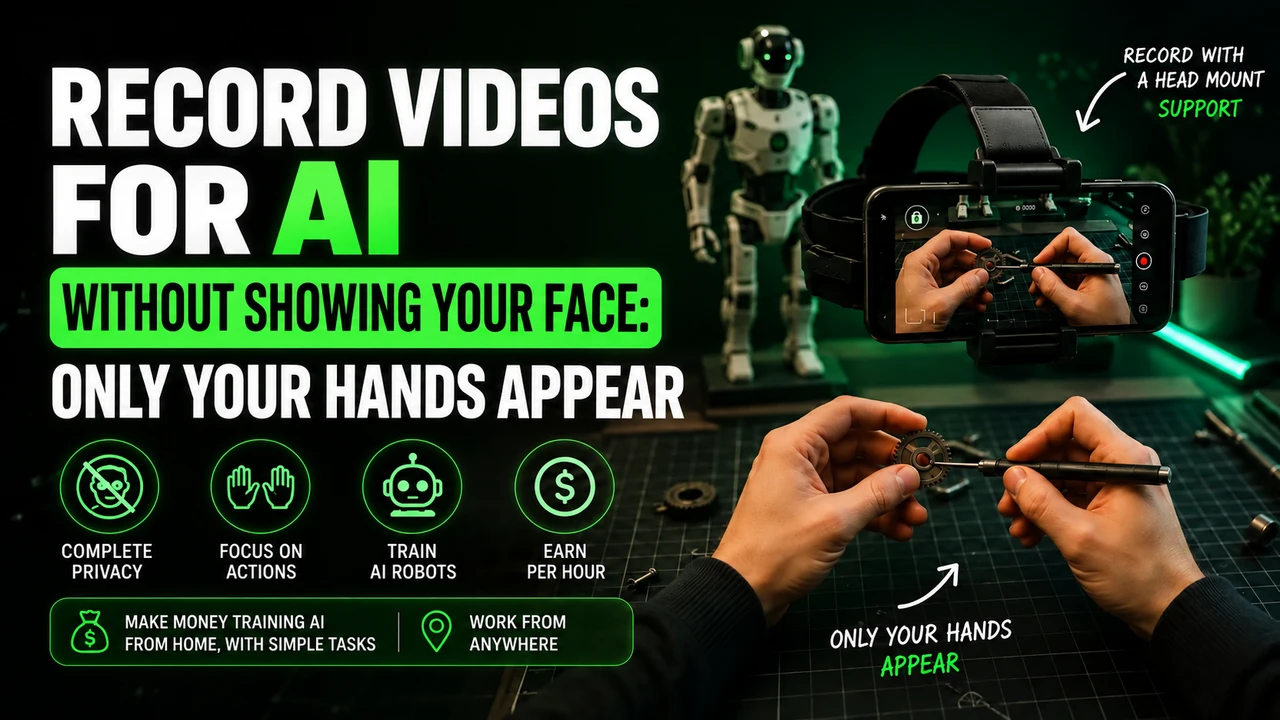
At MIMIX, preparation starts with two things: a properly linked Minute Data account and a cell phone strapped to your head. Recording in first person is filming as if the camera were in your eyes: the viewer follows your hands picking up, using and storing objects. This material helps train artificial intelligence for physical tasks, including applications in humanoid robots.
head strap: adjust before recording
For video duties on MIMIX, use a headband with a cell phone holder, also called a headstrap. Place the device horizontally and adjust the camera downwards until you can see the area where your hands work. The support needs to be steady when looking from one object to another. Do not replace this framing with a cell phone held in your hand, resting on a table or strapped to your chest.
To prepare this framework, you can buy the cell phone head mount at Shopee. Check if the fit holds your phone model and allows you to direct the lens into your hands. It is an affiliate link for the portal; The advertisement does not represent an endorsement of the accessory by MIMIX.
Which cell phone to use on MIMIX?
MIMIX publishes these templates for the stream with Minute Data:
iPhone 12 to 17 (except 16e and 17e), Google Pixel 6 to 9 and Samsung Galaxy S21 to S26 (except FE models). You can also check your device directly in Minute app. Having a good resolution camera alone does not prove compatibility.
Before spending on equipment, check if your participation is approved. If you need, you can consult the option of renting a compatible cell phone. Confirm the complete model: the iPhone 16e/17e and Galaxy FE versions are outside the list recommended for Minute.
Account and application when working with MIMIX
MIMIX recommends using a new and exclusive email, the same as when registering for MIMIX and Minute Data. Do not reuse a Minute account already linked to another service: the hours may not appear on MIMIX dashboard. You may prefer Gmail for practicality, but this preference is not an email branding requirement.
The Minute Data is used to select activity, record, send and track sessions. Install via the official integration link. Read the instructions displayed before capturing and check if the sending has finished; Leaving the video on the device does not mean it has arrived for analysis.
The invitation code synchronizes
If Minute requests an invitation or organization code, obtain the information in the onboarding flow of your own MIMIX account. This code links the recording to the project; do not confuse it with a people referral link. If the panel does not show the orientation, seek MIMIX support before recording.
How to do the task without looking like a robot
Imagine a task of organizing the pantry on MIMIX. Separate the products that really need to be organized, accommodate them and finish showing the result. Do not remove and place the same packaging several times to increase the time. The video needs to have a real use, with a beginning, execution and conclusion.
Work at your normal pace. Don't keep your arms outstretched all the time just to show your hands; adjust the camera angle. Avoid filming stopped without activity, purposeful slowness and endless actions. The repetition that is part of the job, like washing different dishes, is different from repeating the same gesture unnecessarily.
Alert: be careful with rejections and account blocks on MIMIX
Before pressing record: follow the rules of the task and application indicated. A video rejection and an account block are different situations.
- Don't record sitting down in domestic tasks while standing. Only do a seated task if the specific instructions clearly authorize it.
- Do not artificially lengthen the video. Avoid long waits, staged tasks and repeated movements without progress.
- Don't force a robot posture. Move your hands and arms naturally while performing the activity.
- Keep children out of the recording. Do not capture the faces of adults or children; Also check out mirrors, photographs and screens around.
- Wear appropriate clothing for the activity. Keep the focus on your hands and objects, avoiding exposing your torso, neck or other parts of your body unnecessarily. Hands and forearms are part of the frame of the action; follow the task if it asks for another detail.
- Do not improvise the camera position. Use the required head mount and check light, clarity, battery and headroom.
- Do not submit a task other than the one chosen. Check the recording instructions and destination before you begin.
These precautions guide the preparation of the video. The suspension conditions are those of MIMIX design and the application used; There is no basis for assigning a single ban policy to all projects.
The Minute no longer lets you record: what to do?
Check the displayed message, update the application and check the device and connection. For Minute, the reference is iPhone 12 to 17 (except 16e and 17e), Google Pixel 6 to 9 and Samsung Galaxy S21 to S26 (except FE models). If the device is not supported, test access on a supported model as per design guidance.
If there is suspension, record the message and ask the support indicated by MIMIX for analysis. Deleting the account and opening another one with a different email is not a guaranteed solution to a ban. Only recreate the account if support advises you and the rules allow it. Exclusive email to link a project should not be confused with authorization to bypass a suspension.
Last conference for MIMIX
Before starting a MIMIX session, confirm the linked email, selected task, tight headstrap, and visible hands. When finished, check the submission and follow the analysis on the panel. Recording longer does not guarantee approval.
Check again: iPhone 12 to 17 (except 16e and 17e), Google Pixel 6 to 9 and Samsung Galaxy S21 to S26 (except FE models), when the stream uses Minute. Validate the model in the app before purchasing or renting.
Reference consulted on 09/10/2026: MIMIX: information about operation and projects. The account, capture, and device guidance above considers this flow.