Brazilian platform
Flambra Tasks: How to record everyday videos for AI
A helpful video shows an activity actually happening. This guide explains how to turn a permitted task into a comprehensible recording, with visible hands, beginning, execution and result.
By Daniel Olímpio · Updated 9/10/2026
This guide contains a referral link. The portal may receive a commission or benefit if you participate by invitation, at no additional cost to you.
What does it mean to record in first person?
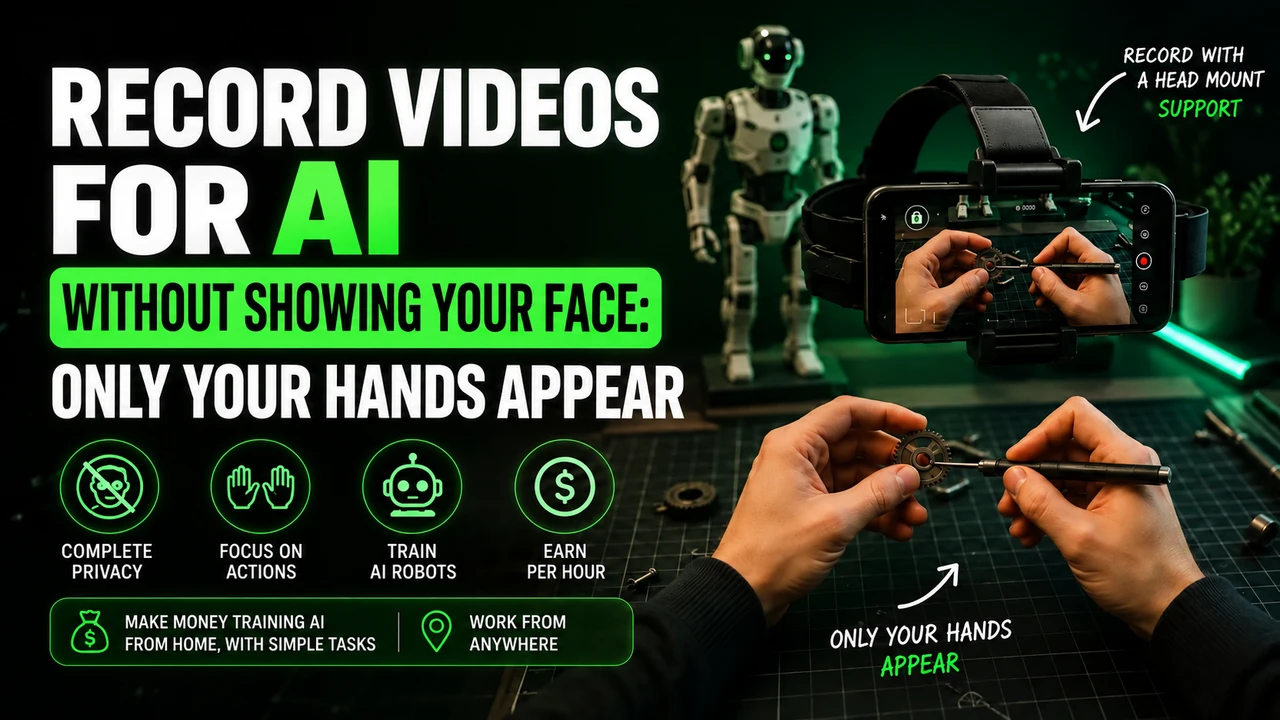
Imagine that someone else could see the task from your eye level. That's the idea of first-person video: the camera follows your attention while your hands use the objects. The headstrap secures the phone to your head so you don't have to hold it.
If the camera points at the wall while you work at the bench, the video misses the main action. Adjust the angle before starting. Don't stretch your arms all the time to reach the image: the camera position must adapt to the task.
Examples for planning an authorized task
| Activity | A sequence with result | What to avoid |
|---|---|---|
| Organize utensils | Separate, accommodate and leave each item in its place. | Disorganize everything to replay the video. |
| Taking care of the dishes | Pick up used parts, clean and organize them when finished. | Scrub the same clean part for several minutes. |
| Sort clothes | Group parts and organize a real quantity. | Folding and unfolding the same clothes unnecessarily. |
| Prepare packaging | Separate materials and complete authorized volumes. | Show labels with names and addresses. |
| Organize tools | Sort and store used items in a safe task. | Operating equipment that you do not know how to use. |
These examples help you plan execution. They do not replace the list of tasks released in the account. Choose the corresponding category and check location, duration and instruction before starting.
Preparation before pressing record
Tidy up the space
Remove documents, screens and objects that distract attention. Leave what will be used nearby.
Check support
The cell phone needs to be stable without blocking the lens. Test the position by reaching for objects.
Look at the image
Use enough light to recognize hands and task details. Clean the lens.
Do the job naturally
Move at your pace and progress towards the result. Avoid long breaks without activity.
Check shipping
After the session, see if it entered the history and follow the evaluation.
Clarity, variety and panel approval
The payment dashboard presented shows indicators of clarity and variety, as well as approvals, disapprovals and refused hours. They help you understand why it's not enough to leave your cell phone recording: the activity needs to be visible and the material needs to be useful.
Clarity, in practice, is being able to follow what happens. Variety does not require changing tasks every moment: in a real organization, you can manipulate different objects and perform necessary steps. Repeating the same gesture without progress does not add a new demonstration.
If there is a refusal, find the reason before recording again. A lighting problem calls for lighting adjustment; a framing problem requires repositioning the camera. Resubmitting the same failure just consumes more time.
I want to record commercial tasks: how do I proceed?
The guidance sent to the portal is to speak to an administrator. Explain what the work is, where it takes place, what objects appear and whether there is movement of people. Wait for guidance before starting collection at the establishment.
For example, packaging products in a reserved space is different from filming customer service. A counter can display orders, screens, customer data and conversations. Plan the framing so as not to transform the routine of commerce into an exhibition for other people.
Have authorization from the person responsible for the location and use the correct task. The possibility of producing videos in a company does not free up any environment or activity.
Where to find support and cell phone
O head strap indicated on the Shopee It is a purchase option. Check measurements, firmness and compatibility with the weight of the device. For the telephone, first consult the models accepted by Flambra and then evaluate the rental option.
Don't make a purchase based on the brand name alone. The right configuration brings together an accepted phone, adequate support and a free task.
Learn more about Flambra
FAQ
Do I have to look like a robot when recording?
No. Make natural human movements and complete a real activity.
Can I record at my work?
Speak to an administrator and check the task and location authorization before recording.
Does the rejected video become a balance?
Check the evaluation results: the panel distinguishes hours under analysis, approved and rejected.
Information verified on 09/10/2026 from the screens provided to the portal, the public presentation and the participation guidelines. Meeting times and payments were informed by the community. Check the current status of your account.
Start your participation in Flambra
Open the registration using our invitation. Check the task and compatibility before investing in equipment.
Referral and purchase links can generate commission for the portal, at no additional cost to you.