 Verified platform
Hub Data: Make Money Collecting Data for AI
Complete guide with real information about payment, available tasks and how to get started.
Base pay
$5.00 / approved hour
Receiving
PIX or transfer
Work
First person video
Brazil
Country active on the network
Transparency
How we classify each piece of information
This article may contain affiliate links. When you register through our link, we may receive a commission at no additional cost to you.
Summary
Hub Data in 30 seconds
The data below was collected on Hub's official website, in the company's public communication and in Brazilian reports and reports. Each card shows the confidence level of the information.
Base pay
$5/hr approved
Base rate announced by Hub. May vary by region and task.
Track released
$3 to $10/hr
Range published for companies, depending on the job and region.
Receiving
Pix or transfer
Check the receiving options available in your account.
Indication
R$ 2,50 + R$ 1,25
Values disclosed for levels 1 and 2. Check the campaign rules.
Recording
First person videos
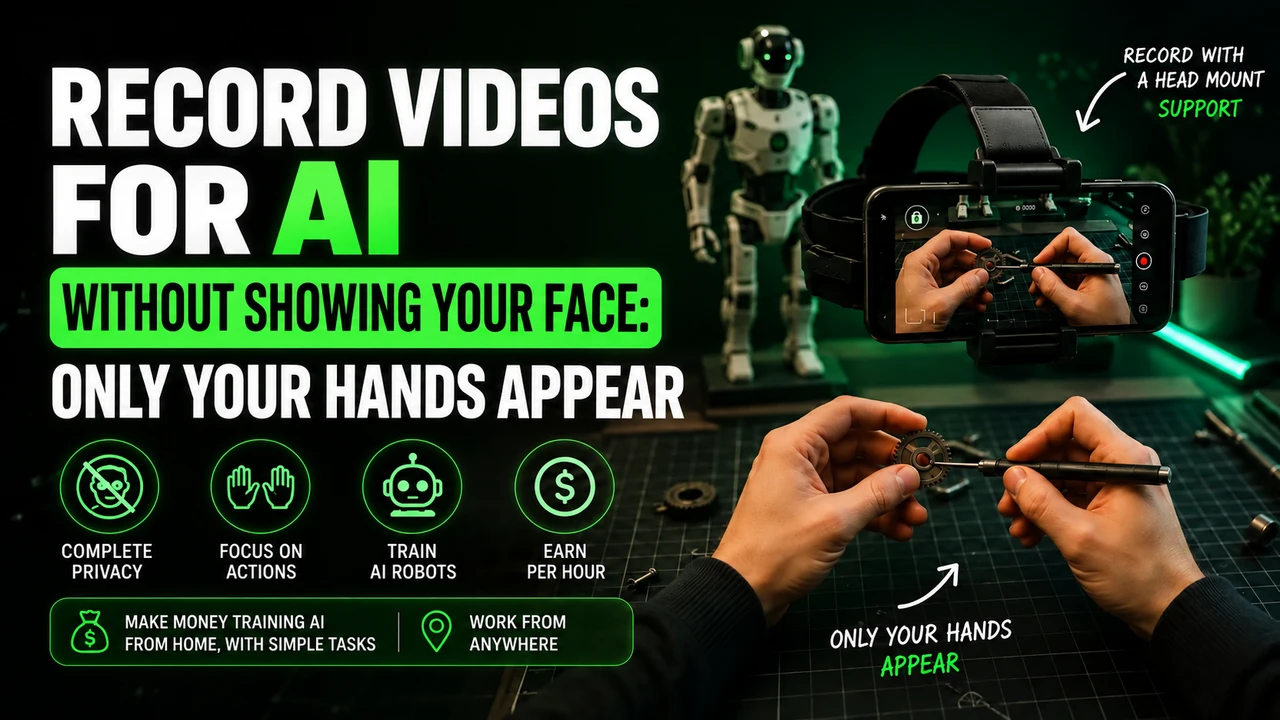
Cell phone on head strap, with hands performing real tasks.
Approval
Quality analysis
The amount goes into the balance after the video is approved.
Verification
ID, CNH or equivalent
Registration may require an accepted ID.
Minimum withdrawal
See the panel
The minimum value was not publicly announced.
The company
What is Hub Data
Hub Data is the real-world data collection operation of Hub Data, a multimodal data laboratory for “physical AI”. The platform’s official proposal is straightforward: train robots and get paid for it, recording real tasks on your cell phone.
The company sells this data to frontier AI labs and robotics companies. The most valuable material is the egocentric video — recorded from your point of view, showing your hands performing the task — because it is precisely the type of data that does not exist on the internet and cannot be copied.
In addition to the network of ordinary people, the Hub maintains a front for companies (Hub for Business), in which teams from restaurants, warehouses, construction sites, workshops, hotels and laundries record their own work shifts with a head-mounted camera.
- Corporate reason
- Hub Data, Inc. · Delaware, USA
- Headquarters
- California, USA
- Foundation
- 2024
- Leadership
- Tim Sprecher · co-founder and CEO
- Investment
- Y Combinator (2026) and SwissBorg
- Network
- 150 thousand+ people · 730+ companies · 150 countries
- Customers
- AI and robotics labs
- Sign up
- Access in Portuguese
Payment
How much Hub Data pays (real values)
The Hub has publicly announced the permanent increase in the base contributor rate to $5.00 per approved hour. The full range published is from US$3 to US$10 per hour, depending on the type of work and the scarcity of that data.
| Reference | Value | Approximate equivalent | Source |
|---|---|---|---|
| Current base rate | $5.00 / approved hour | ≈ R$26 / hour | Official information (Hub) |
| Previous base rate | $4.00 / approved hour | ≈ R$ 21 / hour | Official information (Hub) |
| Published track | $3 to $10 / approved hour | ≈ R$15 to R$52 / hour | Official information (Hub) |
| Values quoted in Brazil | R$20 to R$30/hour approved | Depends on the campaign and quote | Verified information |
| Referral bonus | R$ 2.50 (level 1) + R$ 1.25 (level 2) | Up to approximately R$23.75 per valid hour | Verified information |
| Minimum withdrawal | Information not publicly available. We recommend checking directly after registering. | — | Estimation/calculation |
US$/week
—
R$/week
—
US$/month
—
R$/month
—
Mathematical estimate with a quote of US$1 ≈ R$5.15. It does not represent a guarantee of hours or income.
Step by step
How it works, from registration to payment
- 01
Create account
Free registration on Hub Data platform with email and basic data.
- 02
Verify identity
Sending a document (RG, CNH or equivalent) to validate the account.
- 03
Check cell phone
Confirm that your device is compatible with the required recording.
- 04
Assemble the setup
head strap with the cell phone pointed at the hands.
- 05
Save the task
Follow the campaign script and record from start to finish, without cuts.
- 06
Send and wait
Upload via the app/panel and check the quality of the material.
- 07
Receive
Approved hours become a balance and withdrawals are made via PIX or transfer.
Flow based on the official Hub website and Brazilian reports that tested the registration. Updated on 08/27/2026.
Tasks
Tasks available at Hub Data
List of tasks that we found in official Hub communication and user reports. Availability changes depending on open campaigns.
Household chores
Wash dishes, fold clothes, make the bed, put away shopping, organize objects.
Payment: Approved hourly base rate ($5.00)
Difficulty: Easy
Kitchen
Food preparation, use of utensils, cleaning and organizing the kitchen.
Payment: Approved hourly base rate
Difficulty: Easy
Shopping and market
Recording supermarket purchases and handling products on shelves.
Payment: Approved hourly base rate
Difficulty: Medium
Garden and outdoor area
Watering plants, pruning, weeding, yard cleaning and landscaping.
Payment: Approved hourly base rate
Difficulty: Easy
Workshop, electrical and hydraulic
Technical services: plumbing, electrical, air conditioning, bodywork and tires.
Payment: Highest range in the table (up to $10/h on scarce projects)
Difficulty: Advanced
Commercial work (Hub for Business)
Restaurant, warehouse, construction site, light assembly, commercial laundry, hospitality, carpentry, recycling and events.
Payment: $3 to $10 per approved hour
Difficulty: Medium
Image collection
Photograph objects, products, environments and specific scenes for datasets.
Payment: Information not publicly available. We recommend checking directly after registering.
Difficulty: Easy
Audio and voice
Multilingual field recordings used in Hub audio datasets.
Payment: Information not publicly available. We recommend checking directly after registering.
Difficulty: Easy
Classification and annotation
Categorization, review and annotation campaigns for data that appear in certain periods.
Payment: Information not publicly available. We recommend checking directly after registering.
Difficulty: Medium
Requirements
What you need to get started
Valid document for identity verification
Majority according to the platform’s terms
Compatible cell phone (check the platform before purchasing accessories)
Cell phone holder/headband
Brazil among the network’s active countries
PIX key or bank account in your name
Stable internet to upload large videos
Brazil
Availability in Brazil
Is Brazil accepted?
Yes. Hub declares operations in 150 countries and Brazil appears in local reports, with residents recording tasks and receiving payment.
How many tasks for Brazil?
The exact number of campaigns open to Brazilians is not published. It changes week to week, so the real checking is within the dashboard.
How do Brazilians receive it?
PIX and bank transfer are listed on the official withdrawal panel, with processing by a local payment partner.
Application
Application and how to send recordings
Minute Data for iPhone and Android Compatible
The Hub Data directs recordings to Minute, available through the official links for iPhone and Android. Use the same email as your Hub account and confirm your organization code before getting started.
- Camera
- Microphone (when the campaign requests audio)
- Storage to save videos
Payment
Payment and withdrawal methods
PIX
Listed on the official withdrawal board. Most direct path for Brazilians.
Bank transfer
Also listed as a withdrawal option on the Hub panel.
Crypto (USDC)
Announced by the company as a planned option in 2026 reports.
PayPal/Payoneer
We do not confirm these wallets for Brazilian accounts. Information not publicly available. We recommend checking directly after registering.
Analysis
Is Hub Data reliable?
- Registered and identifiable company (Hub Data, Inc., San Francisco)
- Backed by Y Combinator and investment rounds disclosed
- Declared customers: AI and robotics laboratories
- Free registration, no charge to get started
- Brazilian reports of payment received via PIX
- Minimum withdrawal amount and deadlines not clearly published
- Many videos of affiliates exaggerating earnings promises
Our editorial reading: the business model is real and verifiable. Hub Data, Inc. is a US-based company with outside investment and customers in the robotics industry — it needs this video and pays for it.
The point of attention is not the company, it is the expectation. Only the approved time generates payment, the campaign queue fluctuates and many affiliate videos promise earnings that the platform never guaranteed. Treat it as variable extra income.
We did not find processes or complaints in a relevant volume in Brazilian public databases about non-payment, but rather positive reports of withdrawals via PIX. It's still a new platform (2024), so the track record is short.
Balance
Pros and cons of Hub Data
Pros
- Payment in PIX, without needing an international wallet
- Public base rate of $5.00 per hour approved
- Simple, day-to-day tasks, without technical experience
- You don't need to appear: just your hands enter the frame
- Company identified, based in the USA and supported by accelerator
- Two-tier referral program
Cons
- Only approved time generates payment: bad video is rejected
- Campaign availability varies week to week
- Need to purchase or receive a head strap
- Not all cell phones are accepted
- Minimum withdrawal amount is not clearly published
- No guarantee of fixed income or volume of tasks
Comparative
Hub Data x other platforms
| Platform | Payment | Receiving | Brazil | Task type |
|---|---|---|---|---|
| Hub Data Official information (Hub) | $5/hr approved (range $3–10) | PIX and bank transfer | Yes, country active on the network | First-person video and data collection |
| Appen Verified information | Varies by project; typically per hour or per task | International wallets (e.g. Payoneer) | Yes, with projects in Portuguese | Annotation, search evaluation and collection |
| TELUS Digital (formerly Lionbridge) Verified information | Varies by project | International/transfer wallets | Yes, with projects in Portuguese | Content and data evaluation |
| Remotetasks User report | By task completed | International wallets | Unstable availability over time | Image and text annotation |
The comparison uses public information from each platform. Design conditions change frequently.
FAQ
Hub Data FAQ
How much does Hub Data pay per hour?
The company's publicly disclosed base rate is US$5.00 per approved hour, after a permanent increase from US$4.00. In the corporate area, Hub publishes a range of US$3 to US$10 per approved hour, varying depending on the type of task and regional scarcity. Brazilian reports quote values of around R$20 to R$30 per approved hour.
Does Hub Data really pay? Is it reliable?
Hub Data, Inc. is an identified company, based in San Francisco, founded in 2024, backed by Y Combinator, that sells data to AI and robotics labs. There are reports of Brazilians receiving payments via PIX. Even so, only the approved time is paid and there is no guarantee of income.
Does Hub Data work in Brazil?
Yes. Brazil is among the network's active countries, the official panel lists PIX and bank transfer as withdrawal methods and there are Brazilian reports testing the platform in practice.
Do I need to speak English to use Hub Data?
The platform is international and part of the instructions appear in English. Basic English or the browser's translator is usually sufficient, because the task itself is practical and visual.
What is the minimum withdrawal amount at Hub Data?
Hub informs you that you can withdraw whenever you want, but we did not find an officially published minimum amount. Information not publicly available: we recommend checking directly after registration.
Do I need to show my face in videos?
No. The recording is in first person: the cell phone is on a head strap and only the hands and the task area appear in the frame.
Do I need to pay anything to join Hub Data?
No. Registration is free. The only possible cost is the head strap for the cell phone, and there are reports of kits being sent free of charge in some campaigns.
Why might my video be rejected?
The most common reasons are hands outside the frame, blurry or dark image, task cut in half, third-party people appearing and material outside the script requested by the campaign.
I want to start at Hub Data
Free registration, recording via cell phone and withdrawal via PIX. Only the approved time is paid.
This article may contain affiliate links. When you register through our link, we may receive a commission at no additional cost to you.
How to record first person for Hub Data
At Hub Data, you use Minute to record everyday tasks in first person. Think of the camera as a pair of eyes: it follows what you're doing and shows your hands in contact with objects. These records can help artificial intelligence and robotics systems learn human actions, including tasks useful for humanoid robots.
head strap: adjust before recording
The Hub Data recording flow uses a cell phone on the forehead with a headband and support, the headstrap. Adjust the position before you start, with the phone horizontal and the lens aimed at the task. Don't improvise by leaving your cell phone on a shelf or asking someone to film you. Keep your hands free to work and test whether the device remains steady when you move.
To prepare this framework, you can buy the cell phone head mount at Shopee. Check if the fit holds your phone model and allows you to direct the lens into your hands. It is an affiliate link for the portal; The advertisement does not represent an endorsement of the accessory by Hub Data.
Hub Data also announces a Starter Kit. Check your account for availability before purchasing a separate support.
Which cell phone to use on Hub Data?
The Hub Data configuration page reports the following cell phones for Minute:
iPhone 12 to 17 (except 16e and 17e), Google Pixel 6 to 9 and Samsung Galaxy S21 to S26 (except FE models). You can also check your device directly in Minute app. Having a good resolution camera alone does not prove compatibility.
Before spending on equipment, check if your participation is approved. If you need, you can consult the option of renting a compatible cell phone. Confirm the complete model: the iPhone 16e/17e and Galaxy FE versions are outside the list recommended for Minute.
Account and application when working with Hub Data
Reserve an email for your work at Hub Data and use the same address when creating Minute account linked to the Hub. Gmail is an organization suggestion, not a confirmed requirement. Keep this account dedicated to Hub Data; do not use the same Minute link to send hours to two platforms. If another link already exists, ask for guidance before registering or changing accounts.
The Minute Data is used to select activity, record, send and track sessions. Install via the official integration link. Read the instructions displayed before capturing and check if the sending has finished; Leaving the video on the device does not mean it has arrived for analysis.
The invitation code synchronizes
The invitation or organization field in Minute is used to synchronize your participation. Get the code from your own Hub Data account integration instructions; if necessary, consult the official channel indicated there. Do not copy other people's account codes. Check the selected organization before the first video: having installed the app does not mean that the synchronization is finished.
How to do the task without looking like a robot
In a dish recording for Hub Data, show the work happening: taking a piece, washing it, rinsing it and putting it on the drainer. Follow the chosen category and complete the service. Avoid rubbing an already clean item or leaving the camera on while you wait, doing nothing.
Work at your normal pace. Don't keep your arms outstretched all the time just to show your hands; adjust the camera angle. Avoid filming stopped without activity, purposeful slowness and endless actions. The repetition that is part of the job, like washing different dishes, is different from repeating the same gesture unnecessarily.
Alert: be careful with rejections and account blocks on Hub Data
Before pressing record: follow the rules of the task and application indicated. A video rejection and an account block are different situations.
- Don't record sitting down in domestic tasks while standing. Only do a seated task if the specific instructions clearly authorize it.
- Do not artificially lengthen the video. Avoid long waits, staged tasks and repeated movements without progress.
- Don't force a robot posture. Move your hands and arms naturally while performing the activity.
- Keep children out of the recording. Do not capture the faces of adults or children; Also check out mirrors, photographs and screens around.
- Wear appropriate clothing for the activity. Keep the focus on your hands and objects, avoiding exposing your torso, neck or other parts of your body unnecessarily. Hands and forearms are part of the frame of the action; follow the task if it asks for another detail.
- Do not improvise the camera position. Use the required head mount and check light, clarity, battery and headroom.
- Do not submit a task other than the one chosen. Check the recording instructions and destination before you begin.
These precautions guide the preparation of the video. The suspension conditions are those of Hub Data design and the application used; There is no basis for assigning a single ban policy to all projects.
The Minute no longer lets you record: what to do?
Check the displayed message, update the application and check the device and connection. For Minute, the reference is iPhone 12 to 17 (except 16e and 17e), Google Pixel 6 to 9 and Samsung Galaxy S21 to S26 (except FE models). If the device is not supported, test access on a supported model as per design guidance.
If there is suspension, record the message and ask the support indicated by Hub Data for analysis. Deleting the account and opening another one with a different email is not a guaranteed solution to a ban. Only recreate the account if support advises you and the rules allow it. Exclusive email to link a project should not be confused with authorization to bypass a suspension.
Last conference for Hub Data
In Hub Data flow, first check that the account is linked to the correct organization. Then check the device, the task and the framework. When finished, follow the synchronization and analysis; Submitted time and approved time are different steps.
Check again: iPhone 12 to 17 (except 16e and 17e), Google Pixel 6 to 9 and Samsung Galaxy S21 to S26 (except FE models), when the stream uses Minute. Validate the model in the app before purchasing or renting.
Reference consulted on 09/10/2026: Hub Data: information about operation and projects. The account, capture, and device guidance above considers this flow.