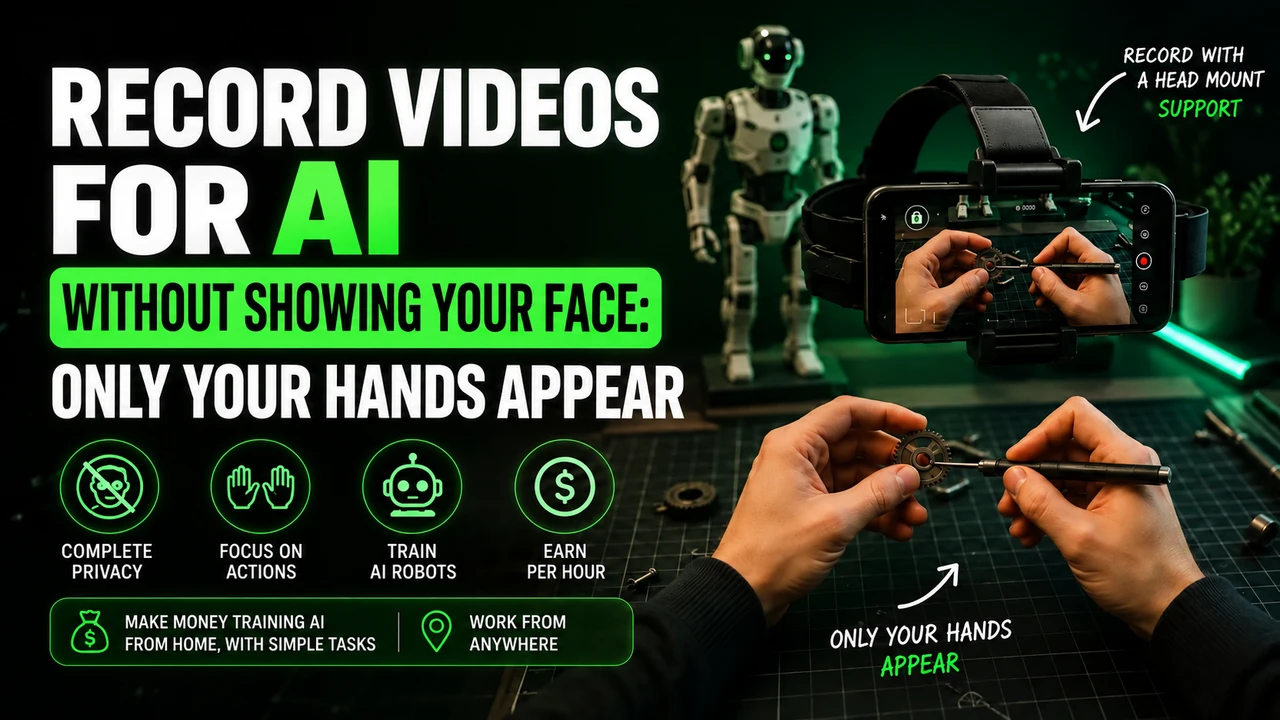
MIMIX: how the video platform works to train artificial intelligence
Registration, tasks, equipment, approval, payments and privacy: an independent analysis of what MIMIX publicly confirms — and what still needs to be verified on the panel.

Transparency: This article contains our MIMIX affiliate link. The blog may receive a commission or benefit for the referral, at no additional cost to those who register. All registration buttons point exclusively to https://mimix.video/.
The MIMIX proposal is based on a concrete problem in artificial intelligence: models capable of writing, talking and interpreting images still need to learn how the physical world works. To do this, AI companies need supported examples of people moving objects, organizing environments and completing real tasks. MIMIX presents itself as the infrastructure that coordinates this collection, connects instructions to a distributed network of collaborators and reviews the material before delivering it as structured data.
For those who find the platform looking for extra income, the practical question is different: what exactly will be recorded, what equipment is needed, how much do they pay, how is the video approved and when can the money be withdrawn? The institutional page responds well to the collection logic and quality flow, but leaves commercial details within the account, terms or specific campaigns. This guide preserves that difference. When information is not published, it is not filled with supposition.
Quick responseMIMIX in a few lines
MIMIX AI claims to transform collection needs into coordinated, consented, and model-ready programs. Distributed collaborators receive guided tasks, record real-world activities, and submit recordings that are checked for task, continuity, and technical quality. Public employee registration is available in Portuguese, takes about five minutes and is presented in four steps: account data, email verification, review and completion.
| Point | What has been confirmed | What needs to be consulted |
|---|---|---|
| Proposal | Guided collection of real tasks for physical intelligence data. | Objective, client and specific use of each project. |
| Sign up | Public stream in Portuguese, with name, email, password, terms and privacy notice. | Final eligibility, countries and possible documents. |
| Equipment | The registration says that real tasks are recorded with the cell phone. | Compatible models, support, resolution and storage. |
| Quality | Task review, continuity and technical quality. | Deadline, minimum grade, appeal and possibility of retaking. |
| Compensation | The platform recruits employees for collection programs. | Amount, calculation, currency, method, minimum and withdrawal schedule. |
| Scale | The institutional page declares almost one million collaborators and daily recording. | Number of tasks available for each account. |
Don't confuse registration with a promise of income
Creating an account demonstrates interest in collaborating. It does not reserve hours, does not guarantee a campaign, does not guarantee approval and does not replace employment. Before recording, confirm the value, payment unit and all conditions within the offer.
The company behind the flowWhat is MIMIX?
MIMIX AI doesn't just describe itself as a video app. Its public communication is focused on operating data programs for systems that need to perceive and act off-screen. The site talks about robotics, embedded systems and multimodal models: technologies that combine vision, movement, language, sound or other signals to interpret real situations.
The proposed infrastructure has two sides. From one, an organization defines the behavior, viewpoint, and environment that its model needs to understand. On the other hand, distributed collaborators follow instructions and capture demonstrations. Between these sides, MIMIX coordinates consent, guidance, quality control, metadata, and delivery.
This intermediation is important because useful training videos are not just random footage. Each program needs to answer a question: which movement should appear? Can the object be out of frame? Should the task be continuous? Does the angle represent the expected point of view? Does the environment contain enough diversity? Is the material authorized to be used? Without this design, scaling produces noise instead of learning.
Distributed network
The institutional source states real-world coverage and nearly one million contributors.
Guided instruction
Capture starts with a defined objective, not with videos sent without context.
Human review
The MIMIX highlights task checking, continuity and technical quality.
Consent
Privacy by design, explicit consent and traceability appear as public principles.
Why everyday tasks have valueWhat is the relationship between MIMIX, AI and humanoid robots?
Models trained on text alone can explain how to fold a t-shirt, but that doesn't mean they know how to recognize each visual stage of the task or control a robotic body. In the physical world, small variations matter: fabrics deform, objects slip, lighting changes, one hand partially covers another, and different people choose different sequences.
Guided videos help vision and action systems observe temporal relationships. The model can learn that an object has changed position, that a drawer needs to be opened before receiving a utensil, or that a surface has been cleaned in overlapping movements. When there is a point of view close to that of the person, hands, tools and results are associated with the same context.
This does not allow us to state that every video sent to MIMIX will be used directly to command a specific humanoid robot. The website places the company in the market for physical intelligence, robotics and multimodal models, but the exact destination must be included in the project and the consent accepted by the employee. Use may involve training, evaluation, searching, validating, or composing data sets.
Fact and interpretation
It is confirmed that MIMIX coordinates real-world collection for data programs and cites robotics and embedded systems. Explaining how demonstrations support perception and action is the technical context of the sector; the concrete purpose of each recording needs to be in the briefing.
From order to datasetHow does MIMIX work?
The official website summarizes the operation in three business stages: capture, quality and delivery. For the employee, this flow can be translated into a practical sequence, with the exception that names and screens may change.
- 01
Account
The interested party creates a collaborator access with name, email and password and reads the terms and privacy notice.
- 02
Verification
The email address is validated and the registration goes through the review stage indicated on the form itself.
- 03
Eligibility
The panel must identify the country, profile, equipment or other conditions necessary for the available program.
- 04
Instruction
The person reads the objective, format, precautions, remuneration and criteria before accepting the task.
- 05
Capture
The activity is recorded in the real world with the cell phone and according to the requested point of view.
- 06
Quality
Material is reviewed for correct activity, continuity, and technical requirements.
- 07
Result
Only the campaign rule can tell you how approval, balance, and payment relate to each other.
The expression “task-oriented” deserves attention. It indicates that the collaborator should not simply record anything they are doing. The usefulness of the video depends on following the instruction and recording the requested behavior. Good footage of the wrong task remains inadequate.
Free account and accessHow to register and join MIMIX
The public form is fully available in Portuguese. The first screen asks for your full name, email address, password with at least eight characters and password confirmation. It also presents two separate boxes: accepting the terms of collaboration and reading the privacy notice. The next button leads to email verification.
| Step displayed | What happens | Recommended care |
|---|---|---|
| 1. Account details | Name, email, password and consents. | Use unique password and check the domain. |
| 2. Check email | Confirmation of the address provided. | Don't share codes or verification links. |
| 3. Review | The platform reviews the registration data. | Don't assume automatic approval. |
| 4. Done | Finalization of the initial flow. | Enter the panel and read the available offer. |
The website states that the process takes about five minutes. This is a registration estimate, not a task release estimate. Once complete, use the official domain login option and check if the project is compatible with your country, language and equipment.
On the open page there is no monthly fee, membership fee, mandatory purchase or initial investment announced. Still, there may be personal costs for internet, energy, space, cell phones and accessories. Don't buy equipment before knowing the requirements and don't pay intermediaries to “activate” your account.
EligibilityWho can participate and in which countries?
Institutional communication emphasizes a global network and offers an interface in English, Portuguese and Spanish. This demonstrates multilingual capability, but is not enough to declare that all campaigns are supported in all countries. Eligibility may depend on location, language, equipment, environment, dataset need, and legal rules.
The Brazilian version of the form shows that Portuguese-speaking people can create a registration. Confirmation of participation in Brazil must occur within the program that appears in the account. If the country is not available, do not change the location, do not use false information, and do not create duplicate accounts.
The public page does not indicate a minimum age. As terms of collaboration and privacy are part of the process, minors or guardians must specifically check this point before providing data. This article does not assume 18 years because the open source consulted did not publish this requirement.
| Possible requirement | Public situation | Where to confirm |
|---|---|---|
| Valid email | Confirmed in registration. | Verification sent by the platform. |
| Secure password | Minimum of eight characters provided. | Account creation screen. |
| Cell phone | Confirmed as a recording instrument. | Briefing for model and configuration. |
| Eligible country | Not publicly detailed. | Profile and active project. |
| Minimum age | Not found in the open area. | Terms and privacy notice. |
| Document/KYC | Not confirmed on the public page. | Dashboard or support if requested. |
What can be requestedWhat types of videos and tasks can appear?
The MIMIX confirms the recording of real-world oriented tasks, but does not publish an open catalog with all activities. Therefore, domestic and professional examples below are meant to explain the common industry format — they are not a promise that they will be available in the account.
| Context | Illustrative examples | What to check |
|---|---|---|
| Kitchen | Organize utensils, prepare ingredients, clean a counter. | Use of knife, heat, food and framing. |
| Home | Fold fabrics, store objects, arrange a shelf. | Privacy, beginning and end of the sequence. |
| Cleaning | Clean surface, separate materials, collect items. | Allowed products and continuity. |
| Maintenance | Simple assembly, safe component exchange, tool use. | Qualification, protection and physical risks. |
| Commerce | Organize products, handle packaging, prepare area. | Company authorization and customer data. |
| Office | Classify materials, assemble kit, organize station. | Screens, documents and confidential information. |
A professional task should only be registered with the authorization of the person responsible for the location and when the briefing allows. Employment contracts, trade secrets, customer protection and security rules continue to apply. Do not film badges, orders, records, internal systems, cards, faces or protected processes.
It is also important not to stage dangerous actions to generate content. Operating equipment, working at heights, working with electricity, carrying out vehicle maintenance or using chemicals requires knowledge and protection. If the activity exceeds your experience, choose another task or ask for official guidance.
Quality starts before RECHow to prepare and record a video for MIMIX
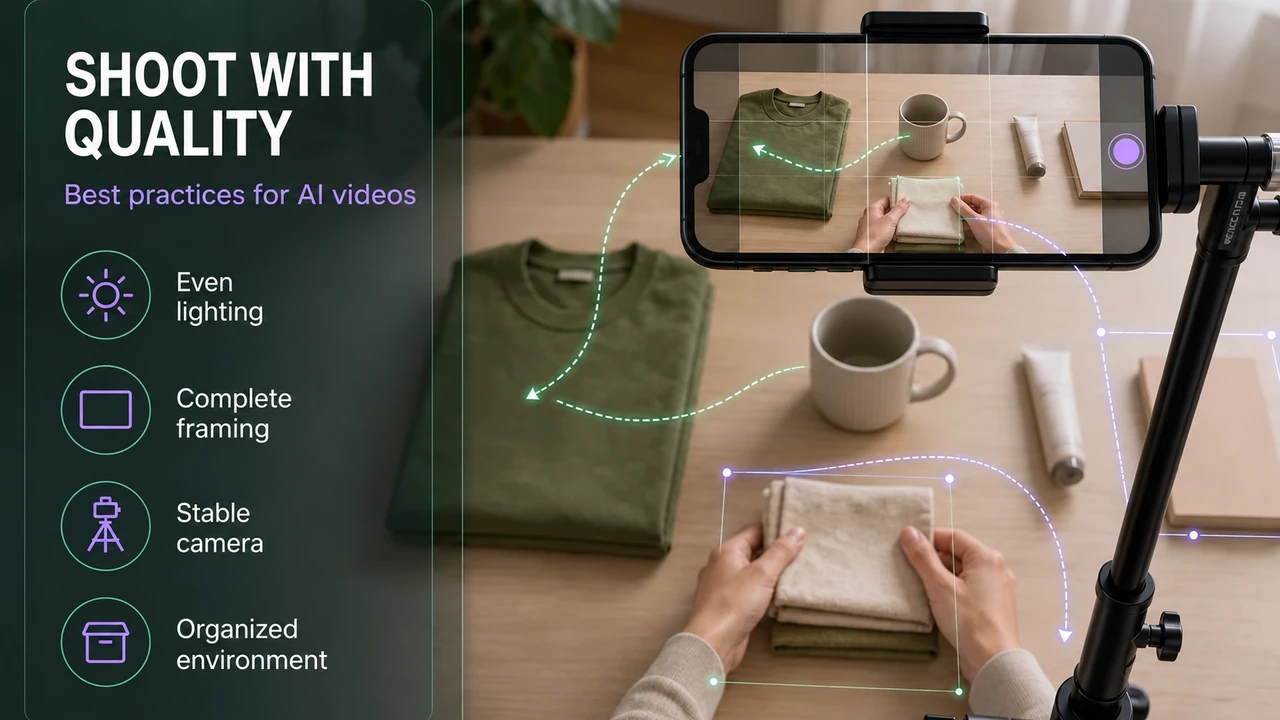
The current guide for MIMIX recommends horizontal recording with the cell phone on the forehead and visible hands. Also check the duration and other conditions of the project. The best procedure is to turn the briefing into a small inspection: equipment, battery, storage, light, visible area, people present, sounds, duration and method of delivery.
Lighting
Prefer uniform light, avoid strong backlight and keep hands and objects visible throughout the action.
Framework
Show the desktop and don't let the important part go out of frame.
Stability
Wear the cell phone headstrap on your forehead and adjust the lens to show your hands at work.
Environment
Remove private items, documents, photos, mirrors and people who do not participate.
Device
Clean the lens, charge the battery, and leave storage free to complete the file.
Continuity
If cuts are prohibited, record the entire sequence without pausing or editing.
A 30-second test prevents a missed session
When instruction permits, record a short test and watch it before the actual session. Notice whether the dominant hand covers the subject, whether there is reflection, whether the camera changes angle, and whether private details have entered the frame. Also check whether the requested audio is understandable or, if not necessary, whether third-party conversations can be heard.
The cell phone must be placed on the head strap
In MIMIX's first-person video stream, the phone follows your gaze. Wear a headstrap, leave your hands free and don't replace the frame with a fixed or chest camera.
To deepen your preparation, consult the articles already published on cell phone and equipment for AI videos e privacy when recording without showing your face.
Quality controlHow are videos analyzed and why might they be rejected?
The MIMIX declares three axes of verification: task, continuity and technical quality. The first asks whether the person actually performed the requested behavior. The second checks whether the required sequence is complete. The third considers whether the material is technically usable.
| Possible reason | How does it manifest | How to prevent |
|---|---|---|
| Incorrect task | The action does not correspond to the objective or ends before the result. | Read the main verb, the steps and the expected result. |
| Break in continuity | Cuts, pauses or essential parts missing. | Record from start to finish when the project requires sequence. |
| Inappropriate framing | Hands, object or action are left out of the image. | Test and mark the work area. |
| Unstable image | Movement prevents tracking details. | Fix the device according to the brief. |
| Insufficient light | Shadows, reflections, or blur hide activity. | Adjust the light and clean the lens. |
| Privacy | Face, document, screen or personal data appears. | Prepare the environment and review the file before sending. |
| Incomplete file | Upload interrupted or recording corrupted. | Use stable connection and confirm status on dashboard. |
The open source does not inform review deadlines, attempt limits or the right to redo. If a video is rejected, look for the reason displayed in the dashboard and do not resubmit the same file without correcting the error. Keep allowed records of the task, date, and result to facilitate a conversation with support.
Approval is an editorial and technical step
A beautiful video can be disapproved if it does not comply with the instruction; a simple video can be helpful if the task is complete, continuous, and technically readable. Prioritize grip, not effects or editing.
No made up numbersHow much does MIMIX pay and how do payment and withdrawal work?
The public page analyzed does not present a value per hour, price per task, table per level, currency, payment term, minimum for withdrawal or method of receipt. Therefore, this article does not repeat values that circulate on third-party pages and does not transform old material from the blog itself into an official source.
Before accepting a campaign, the participant must be able to answer objective questions: is payment calculated by the time sent or approved? Is it per video, task, project or working hour? Is there a bonus? Does the value change by country? Is there a maximum quantity? Does the balance expire? What currency will be used? Does withdrawal require minimum? Are there fees? How long does it take after approval?
| Financial information | Status in open source | Safe action |
|---|---|---|
| Price per hour or task | Not published. | Read the current offer before recording. |
| Material that generates balance | Not detailed; there is quality review. | Confirm that only approved material is paid for. |
| Currency | Not published. | Check conversion and possible fees. |
| Receiving method | Not published. | Only use the option within the account. |
| Minimum withdrawal | Not published. | Confirm before accumulating balance. |
| Deadline | Not published. | Record approval date and informed calendar. |
| Taxes | Not covered on the institutional page. | Seek guidance appropriate to your situation. |
Income examples are only useful when they start from a confirmed rate. Without it, multiplying hours creates an appearance of precision that doesn't exist. It is also necessary to discount rejected recordings, preparation time, internet, equipment, fees and conversion. The honest analysis is: there is a proposal for collaboration, but the remuneration needs to be known within the opportunity.
Referrals, levels and commissionsHow do indications and rankings work on MIMIX?
We did not find, on the open pages consulted, a public description of a referral system, network commission, levels or rankings. This does not prove that the resource does not exist within the account; it only prevents presenting percentages, positions or requirements as facts.
If the panel offers an invitation, read the rules separately from the recording project. Check when the nomination is assigned, what action needs to be completed, if there is a deadline, if the nominee needs to have approved work and if there is a limit. An affiliate or referral relationship should not be confused with employment, partnership or guaranteed payment.
Nominating people should not be treated as a requirement, because this obligation has not been confirmed. The collaborator needs to know if they can participate with just their own recordings. If the platform conditions a benefit on referrals, the condition must appear before the decision.
Consent and controlPrivacy and security when recording the real world
Institutional communication highlights “privacy by design”, explicit consent, human review and complete traceability. The form reinforces this concern by separating the terms of collaboration from the privacy notice. These are relevant signs, but reading the document remains essential: slogans do not replace details about collected data, purpose, storage, sharing and rights.
Prepare the scene as if it were to be published
Even when use is restricted to training, the file is immediately out of the device's control. Remove documents, correspondence, screens, photos, identified medicines, license plates, keys, faces and voices of others before you begin.
Other people's privacy
Employee consent does not automatically authorize the image of family members, colleagues, customers or visitors. Choose an empty space and interrupt if anyone enters. Children deserve heightened caution; do not include them in recordings without a clear basis and valid authorization provided in the terms.
Professional environments
The right to use your own cell phone at work does not equate to authorization to collect company data. Seek formal consent from the person responsible and confirm that the project accepts that context. Production areas, commercial kitchens, stocks, offices and customer service can reveal procedures, customers, prices or security measures.
Fake account and communications
Use a unique password and keep your email box protected. Be wary of profiles that ask for a code, password, advance payment, wallet, bank key or document via message. If verification is required, it must appear in the official stream or be confirmed by support accessed within the account.
| Risk sign | Why it deserves attention | Recommended answer |
|---|---|---|
| Charge to release tasks | The public register does not display a fee. | Don't pay and confirm on the official website. |
| Guaranteed fixed income | Projects and approvals are variable. | Require written and measurable conditions. |
| Password or code request | Lets take the account. | Never share credentials. |
| Document through informal channel | Creates identity risk. | Use only confirmed secure flow. |
| Application outside of store or domain | May contain malicious software. | Validate the origin on the official dashboard. |
| Pressure to act immediately | Reduces verification time. | Stop and check calmly. |
Signal-based analysisIs MIMIX reliable and really affordable?
The question “is it reliable?” mixes at least three assessments: is there an identifiable operation? Are the rules transparent? Will a specific participant be compensated? Public research allows us to partially answer the first two and does not guarantee the third.
Verifiable signals include active institutional domain, trilingual interface, proprietary registration and login, structured account creation process, terms and privacy notice presented before advancement, explanation of capture flow and quality, and stated commitment to consent and traceability. The company also publishes a significant list of employees.
The limitations are equally important: the open area does not disclose remuneration, withdrawal, eligible countries, minimum age, public support, task list, review deadline, appeal criteria or nomination regulations. Without this information, there is no basis for asserting “it really pays” as a general guarantee, much less for estimating income.
| Criterion | Signal found | Responsible Conclusion |
|---|---|---|
| Digital identity | Functional website, registration and login. | There is verifiable public operation. |
| Work model | Guided capture and review described. | The overall process is consistent with data collection. |
| Consent | Terms and privacy required upon registration. | Read the content before accepting. |
| Compensation | Not publicly detailed. | Only the current offer can confirm this. |
| Individual history | No anonymous testimonials were used. | There is no created proof or generalization. |
| Risk | Tasks, approval and availability vary. | Treat it as a trial opportunity, not a salary. |
Our editorial assessment is balanced: MIMIX presents a public structure consistent with a collection platform for physical intelligence, but interested parties should only start after viewing and saving the project's commercial conditions. Test with small volume, track approval and confirm first receipt before increasing dedicated time.
Conscious decisionWho MIMIX might make sense for — and when to avoid it
The profile that can adapt
- You have a compatible cell phone and internet without having to take on debt.
- Can follow scripts, repeat tasks and review details.
- It has a controlled environment and respects consent.
- You accept that projects and approvals may vary.
- Looking for additional income, not the promise of a salary.
When it is not suitable
- You need fixed income on a guaranteed date.
- You do not agree with the intended uses of the video.
- Your environment contains third parties or data that you cannot remove.
- I would need to buy equipment before the project existed.
- The offer does not provide payment, approval or support.
How to get started safely
- 1Read first
Open offer, terms and privacy; identify usage and remuneration.
- 2Test your equipment
Validate light, framing, battery, space and stability.
- 3Protect the scene
Remove data, obtain authorization, and limit what appears.
- 4Start small
Send a limited quantity and expect quality feedback.
- 5Confirm the cycle
Understand approval and receipt before expanding the routine.
Keep learningFind out more about MIMIX
Consult the guides registration at MIMIX, available tasks e payments to prepare your participation.
Previously published and related articles
Before you start on MIMIX
How to record in first person for MIMIX
At MIMIX, preparation starts with two things: a properly linked Minute Data account and a cell phone strapped to your head. Recording in first person is filming as if the camera were in your eyes: the viewer follows your hands picking up, using and storing objects. This material helps train artificial intelligence for physical tasks, including applications in humanoid robots.
head strap: adjust before recording
For video duties on MIMIX, use a headband with a cell phone holder, also called a headstrap. Place the device horizontally and adjust the camera downwards until you can see the area where your hands work. The support needs to be steady when looking from one object to another. Do not replace this framing with a cell phone held in your hand, resting on a table or strapped to your chest.
To prepare this framework, you can buy the cell phone head mount at Shopee. Check if the fit holds your phone model and allows you to direct the lens into your hands. It is an affiliate link for the portal; The advertisement does not represent an endorsement of the accessory by MIMIX.
Which cell phone to use on MIMIX?
MIMIX publishes these templates for the stream with Minute Data:
iPhone 12 to 17 (except 16e and 17e), Google Pixel 6 to 9 and Samsung Galaxy S21 to S26 (except FE models). You can also check your device directly in Minute app. Having a good resolution camera alone does not prove compatibility.
Before spending on equipment, check if your participation is approved. If you need, you can consult the option of renting a compatible cell phone. Confirm the complete model: the iPhone 16e/17e and Galaxy FE versions are outside the list recommended for Minute.
Account and application when working with MIMIX
MIMIX recommends using a new and exclusive email, the same as when registering for MIMIX and Minute Data. Do not reuse a Minute account already linked to another service: the hours may not appear on MIMIX dashboard. You may prefer Gmail for practicality, but this preference is not an email branding requirement.
The Minute Data is used to select activity, record, send and track sessions. Install via the official integration link. Read the instructions displayed before capturing and check if the sending has finished; Leaving the video on the device does not mean it has arrived for analysis.
The invitation code synchronizes
If Minute requests an invitation or organization code, obtain the information in the onboarding flow of your own MIMIX account. This code links the recording to the project; do not confuse it with a people referral link. If the panel does not show the orientation, seek MIMIX support before recording.
How to do the task without looking like a robot
Imagine a task of organizing the pantry on MIMIX. Separate the products that really need to be organized, accommodate them and finish showing the result. Do not remove and place the same packaging several times to increase the time. The video needs to have a real use, with a beginning, execution and conclusion.
Work at your normal pace. Don't keep your arms outstretched all the time just to show your hands; adjust the camera angle. Avoid filming stopped without activity, purposeful slowness and endless actions. The repetition that is part of the job, like washing different dishes, is different from repeating the same gesture unnecessarily.
Alert: be careful with rejections and account blocks on MIMIX
Before pressing record: follow the rules of the task and application indicated. A video rejection and an account block are different situations.
- Don't record sitting down in domestic tasks while standing. Only do a seated task if the specific instructions clearly authorize it.
- Do not artificially lengthen the video. Avoid long waits, staged tasks and repeated movements without progress.
- Don't force a robot posture. Move your hands and arms naturally while performing the activity.
- Keep children out of the recording. Do not capture the faces of adults or children; Also check out mirrors, photographs and screens around.
- Wear appropriate clothing for the activity. Keep the focus on your hands and objects, avoiding exposing your torso, neck or other parts of your body unnecessarily. Hands and forearms are part of the frame of the action; follow the task if it asks for another detail.
- Do not improvise the camera position. Use the required head mount and check light, clarity, battery and headroom.
- Do not submit a task other than the one chosen. Check the recording instructions and destination before you begin.
These precautions guide the preparation of the video. The suspension conditions are those of MIMIX design and the application used; There is no basis for assigning a single ban policy to all projects.
The Minute no longer lets you record: what to do?
Check the displayed message, update the application and check the device and connection. For Minute, the reference is iPhone 12 to 17 (except 16e and 17e), Google Pixel 6 to 9 and Samsung Galaxy S21 to S26 (except FE models). If the device is not supported, test access on a supported model as per design guidance.
If there is suspension, record the message and ask the support indicated by MIMIX for analysis. Deleting the account and opening another one with a different email is not a guaranteed solution to a ban. Only recreate the account if support advises you and the rules allow it. Exclusive email to link a project should not be confused with authorization to bypass a suspension.
Last conference for MIMIX
Before starting a MIMIX session, confirm the linked email, selected task, tight headstrap, and visible hands. When finished, check the submission and follow the analysis on the panel. Recording longer does not guarantee approval.
Check again: iPhone 12 to 17 (except 16e and 17e), Google Pixel 6 to 9 and Samsung Galaxy S21 to S26 (except FE models), when the stream uses Minute. Validate the model in the app before purchasing or renting.
Reference consulted on 09/10/2026: MIMIX: information about operation and projects. The account, capture, and device guidance above considers this flow.
Objective answersMIMIX FAQ
What is MIMIX?
MIMIX AI presents itself as an infrastructure that connects data collection programs to distributed collaborators. People record real-world task-oriented tasks; recordings undergo review of task, continuity and technical quality.
Does MIMIX pay to record videos?
The public website features employee registration to record real tasks with their cell phones. Values, calculation method and remuneration conditions were not published in the open area consulted; confirm these points on the panel and in the current terms before recording.
Is MIMIX reliable?
There is a functional official website, structured registration, login, communication about consent, human review and privacy. These signals allow you to verify that a public operation exists, but do not guarantee task availability, approval or payment for an individual case.
Is registration at MIMIX free?
The public page allows you to start registration without displaying charges, monthly fees or mandatory purchases. If any costs arise, please confirm directly from the terms and official support before paying.
How much does MIMIX pay?
The open institutional page did not disclose a table of values on the date of this review. The price may vary depending on the program, country, duration, approved material and campaign rules; see the offer displayed in your account.
How to register at MIMIX?
Access the link indicated by the blog, choose the collaborator registration, enter your name, email and a unique password, accept the terms after reading and complete the email verification. The website outlines four steps and estimates about five minutes.
Do I need to pay any fees to get started?
No membership fees or monthly fees appeared in the public register consulted. Do not transfer money to people who promise to release tasks, increase ranking or speed up withdrawals.
What videos can be recorded?
The public source confirms real-world oriented tasks, but does not publish a complete list of activities. The active project on the panel must inform action, environment, point of view, duration and technical requirements.
Is it possible to participate only with your cell phone?
The registration page states that employees register real tasks with their cell phones. For videos using Minute, check the compatible cell phone in the app and use a head strap, with your hands visible.
How are videos approved?
According to MIMIX, recordings are checked for task, continuity and technical quality. The detailed criteria, deadline and possibility of redoing must be consulted in the briefing.
How to receive payment?
Method, currency, minimum withdrawal, fees and deadline were not informed in the public area analyzed. Check this data in the dashboard or with support before putting in many hours.
Is it mandatory to nominate other people?
We did not find a public rule saying that indication is mandatory. If there is a referral program, read its conditions; Recording yourself and referring users are different activities.
Are earnings guaranteed?
No. The result depends on the existence of projects, eligibility, quantity and duration of recordings, quality approval and current commercial conditions.
Does MIMIX work in Brazil?
The website has a full version in Portuguese and a collaborator form, but the territorial eligibility of each program must be confirmed during registration and on the panel.
How do I talk to MIMIX support?
Only use the channel presented within the account or on the official website. The open page consulted did not display a specific public support address, so we do not indicate unverified contacts.
ConclusionIs it worth creating an account at MIMIX?
The MIMIX occupies a real and growing space: transforming consented human actions into data for systems that need to understand the physical world. Its public page clearly explains the capture, review and delivery logic and offers employee registration in Portuguese. This is enough to know the proposal; is not enough to promise how much a person will receive.
The most prudent path is free and gradual: create the account through the indicated channel, read the documents, check if there is a compatible program, register the commercial conditions, test a short recording and observe the quality return. Only after you understand approval and receipt does it make sense to set aside more time. The decision must consider privacy, equipment, availability and tolerance for a variable income.
Discover MIMIX with complete information
Check the registration and current opportunities. There is no guarantee of project, approval or earnings.
ACCESS THE MIMIX VIA THE BLOG LINK